Architecture and Data Flow
How the Match-Trader Ecosystem Works
The Match-Trader platform operates within an integrated ecosystem of three main components (Platform, Backend, CRM):
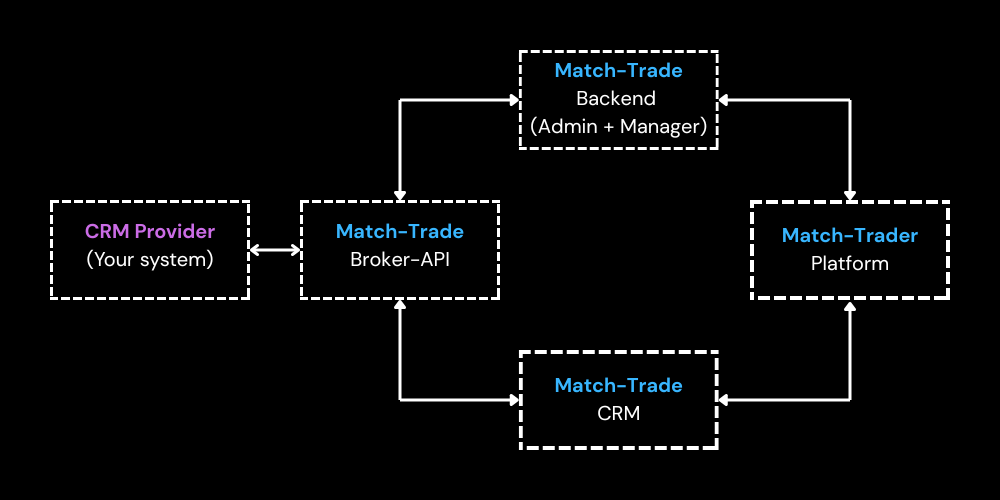
Important: When integrating your system, you only need to connect with Broker-API. There is no need to directly integrate with other components as they are already interconnected.
Role of Individual Components
Match-Trade CRM
- User account management (accounts)
- Mapping of offers with groups created in the admin panel
- Ability to check client details and platform logs (also available via API)
Match-Trade Backend
Consists of two main modules:
Match-Trade Admin
- Configuration-oriented system
- Group creation and management
- Symbol, spread, and other parameter configuration
Match-Trade Manager
- Trading accounts overview
- Open position monitoring
- Access to ledgers, orders, and other operations
Match-Trader Platform
- Trading interface for end users
- Utilizes configuration defined in Admin
- Connected with CRM for account management
Key Concepts
Relationship Between Groups and Offers
- In Backend Admin, groups are created with their parameters (symbols, spreads, etc.)
- In CRM, offers are created that are visible to traders
- Each group created in the admin panel that is to be made public must be mapped to an offer
- During registration, traders see and select offers, not groups
IMPORTANT NOTE: As a CRM Provider, you must integrate with offers in the CRM, not with groups in the Backend. This is a critical distinction as your integration will interact exclusively with the offer structure in the Match-Trade CRM.
Account Structure
- Account - user profile linked to an email address
- Contains personal data (first name, last name, country, address, etc.). Only the email, first name, and last name are required; the rest is optional.
- One user = one Account
- Password is assigned to the Account (email), not to trading accounts
- Email is the account login.
- Trading Account - actual trading account
- One Account can have multiple Trading Accounts
- Each Trading Account is assigned to a specific offer
- Traders can switch between their trading accounts within the platform
Was this section helpful?


On this page
- Architecture and Data Flow