HMAC Authentication
Hash-based message authentication code (HMAC) is a mechanism for calculating a message authentication code involving a hash function in combination with a secret key. This can be used to verify the integrity and authenticity of a message (sent from a client to a server or server to server).
If an intermediate party attempts to intercept and alter an API call for malicious reasons, or where a fault in an intermediary proxy drops key header information, the signature will not match and the API call will be denied.
Our HMAC generator tool can be used to create API calls and and generate the OAuth signature using your API key and secret.
Generating HMAC
Tuned Global will provide the client with a public (Access Key) and a private secret (Secret Key). Both of the keys are base-64 encoded strings, which means they should never contain any non-base-64 characters and the length of each key is always a multiple of 4.
It's the client’s responsibility is to store the Secret Key securely and never share it with other parties. HMAC tokens are one time use only i.e. client needs to generate a new HMAC for every request to the server even if it's for the same resource.
The client must Hash the request content using MD5 hashing algorithm. This typically applies to HTTP GET, PUT and POST requests in which the data is sent to the server in the request body or in query string parameters.
Following fields are required to create HMAC signature
- Access key (to be provided by tuned)
- Secret Key (to be provided by tuned)
- Http method (Get, Post, Put etc)
- UTF-8 encoded request-URI (e.g https://api-delivery-connect.tunedglobal.com/v5/assets encodedusing UTF-8)
- encoded payload (for POST request only)
- nonce
- timestamp
Steps
- Generate a new GUID (to be used as nonce) and a Unix timestamp. See this .net fiddler for an example of how to generate a nonce and timestamp.
- Encode the full URI using UTF-8 encoding. Note: Ensure the encoded string is all in lowercase. Note: Steps 3 - 5 are only applicable for POST requests with a JSON object in the payload. Skip to step 6 for http GETAsset requests or requests where there is no Payload to be sent.
- Serialize the Json object / payload that needs to be sent. (Only for POST requests)
- Convert the serialized Json object / payload to bytes using UTF-8 encoding table (Only for POST requests)
- Hash the above byte array using the standard MD5 hashing algorithm and convert the hashed output back to base64 string. (Only for POST requests)
- Construct a string by concatenating all the fields above to create raw signatures.The expected format is: <access-key><HTTP-method><request-URI><encoded-payload OR string.empty if no payload required><nonce><timestamp>
- Convert formatted raw signature string from above to bytes array using UTF 8 encoding.
- Convert the secret key provided by TG, into a byte array.
- Hash this full concatenated raw signature string using standard HMAC SHA256 hashing algorithm using the secret key byte array.
- Convert the hashed result array from above to the Base64 string. This is the final string which will be used as the unique signature for the request.
- Build Authorization Header value.This value should contain access key, request signature from the step above, nonce and timestamp separated by colon “:”. The expected format is: {access-key}:{request-signature}:{nonce}:{timestamp}
- Add an http Header called Authorization to the request. And the value should be Tuned-HMAC e.g Authorization: Tuned-HMAC {access-key}:{request-signature}:{nonce}:{timestamp}
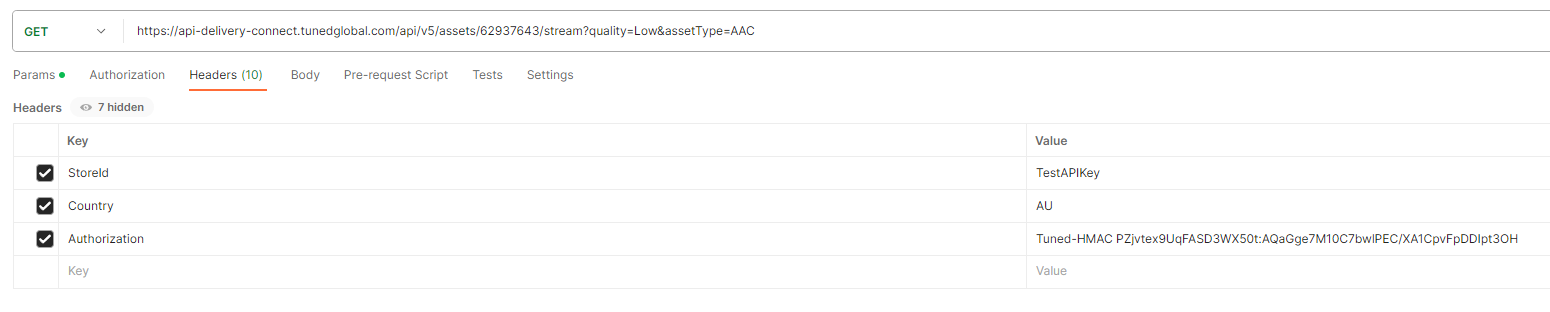
Code Samples for Generating HMAC DotNet
 	public JsonResult GenerateHMAC()
	{
		// Pre-generated access/secret keys. TG to provide to the client.
		var accessKey = "TESTaBcdEfGhONtnZf6y";
		var secretKey = "T35TKLhx5UsRJAJnzwx62bbqFhdqDyBy";

		// Api to retrieve the Stream URL
		var endpoint = "https://api-delivery-connect.tunedglobal.com/api/v5/assets/122256677/stream?quality=High";

		//STEP 1: Generate nonce and timestamp
		// Nonce
		string nonce = Guid.NewGuid().ToString("N");
		// Timestamp using unix time
		DateTime epochStart = new DateTime(1970, 01, 01, 0, 0, 0, 0, DateTimeKind.Utc);
		TimeSpan timeSpan = DateTime.UtcNow - epochStart;
		string requestTimeStamp = Convert.ToUInt64(timeSpan.TotalSeconds).ToString();


		// STEP 2: Encode request url using UTF8 encoding
		//Note: Ensure the encoded string is all in lowercase.
		var uri = System.Web.HttpUtility.UrlEncode(endpoint, Encoding.UTF8);

		//Note: Skip to step 6 for http GET requests or requests where there is no Payload to be sent with the request

		// STEP 3: Serialize Json object / payload

		var data = new SampleRequestPayload { Id = 1, Name = "Joe Bloggs"} ;
		//Serialize to string
		string serializedData = JsonConvert.SerializeObject(data);


		// STEP 4: Convert serialized payload to bytes using UTF8 encoding table
		byte[] content = Encoding.UTF8.GetBytes(serializedData);

		// Initialize authentication code
		var authCode = string.Empty;


		// STEP 5: Hash the request body using MD5 hashing algorithm
		MD5 md5 = MD5.Create();
		byte[] requestContentHash = md5.ComputeHash(content);
		//  Convert hashed data to base 64 string
		string requestContentBase64String = Convert.ToBase64String(requestContentHash);


		// STEP 6: Create Raw signature string. Format: {your-access-key}{http-method}{request-url}{request-body-base64-string}{nonce}{timestamp}
		string signatureRawData = String.Format("{0}{1}{2}{3}{4}{5}", accessKey, "PUT", uri, requestContentBase64String, nonce, requestTimeStamp);


		// STEP 7: Convert formatted signature raw string to bytes
		byte[] signature = Encoding.UTF8.GetBytes(signatureRawData);


		// STEP 8: Coverty secret key to byte array
		var secretKeyByteArray = Convert.FromBase64String(secretKey);


		//STEP 9: Create HMAC for signature string using secret key byte array
		using (HMACSHA256 sha = new HMACSHA256(secretKeyByteArray))
		{
			// Sign the request
			byte[] signatureBytes = sha.ComputeHash(signature);

			// STEP 10: Convert the signatureBytes result to base64 string
			string requestSignatureBase64String = Convert.ToBase64String(signatureBytes);

			//STEP 11: Generate authentication code. Format: {your-access-key}:{signature}:{nonce}:{timestamp}
			//This is the file signature string that needs to be sent in Tuned-HMAC auth header
			authCode = string.Format("{0}:{1}:{2}:{3}", accessKey, requestSignatureBase64String, nonce, requestTimeStamp);
		}

		return Json(authCode);
	}
Javascript for node.js
const crypto = require("crypto");const https = require("https");// provided by Tuned Globalconst accessKey = "accessKeyFromTG";const secretKey = "SecretKeyFromTG";function generateNonce() { return crypto.randomBytes(16).toString("hex");}function generateTimestamp() { return Math.floor(Date.now() / 1000);}function urlEncode(uri) { const uriEncoded = encodeURIComponent(uri); return uriEncoded.replace(/%\w\w/g, match => match.toLowerCase());}function md5Hash(content) { return crypto.createHash("md5").update(content).digest("base64");}function hmacSha256(secretKeyBytes, message) { return crypto .createHmac("sha256", secretKeyBytes) .update(message) .digest("base64");}function generateAuthorizationHeader(method, uri, payload) { const nonce = generateNonce(); const timestamp = generateTimestamp(); const ecodedUri = urlEncode(uri); const rawSignature =accessKey + method + ecodedUri +""+ nonce + timestamp; const rawSignatureBytes = Buffer.from(rawSignature, "utf-8"); const secretKeyBytes = Buffer.from(secretKey, "base64"); const requestSignature = hmacSha256(secretKeyBytes, rawSignatureBytes); return Tuned-HMAC ${accessKey}:${requestSignature}:${nonce}:${timestamp};}// Usage example// 123456789const method = "GET";const uri = "https://api-delivery-connect.tunedglobal.com/api/v5/assets/123456789/stream?quality=High&assetType=AAC";const payload = {};var test = generateAuthorizationHeader(method, uri, payload);Python
import base64import codecsfrom hashlib import md5, sha256import hmacimport jsonimport osimport requestsimport timefrom typing import Anyfrom uuid import uuid4import urllib.parsedef timestamp() -> str: return str(int(time.time()))def get_nonce(): # return secrets.token_urlsafe() return uuid4().hexdef encode_url(url: str) -> str: encoded = urllib.parse.quote(url, safe="", encoding="utf8") # Due to a quirk in how .NET's System.Web.HttpUtility.UrlEncode method works # we need to manually lower-case the converted string _except_ for the URL # query parameter keys and values. See the test for an example if urllib.parse.urlparse(url).query: encoded_question_mark = "%3F" pos = encoded.find(encoded_question_mark) lower_url = encoded[:pos].lower() upper_query = encoded[pos:] lower_query = [] i = 0 while i < len(upper_query): char = upper_query[i] if char == "%": # if escaped character, convert to lower lower_query.append(upper_query[i: i+3].lower()) i += 3 else: # don't convert lower_query.append(char) i += 1 encoded = lower_url + "".join(lower_query) return encoded else: return encoded.lower()def encode_json_obj(obj: Any) -> str: utf8_obj = codecs.encode(json.dumps(obj), encoding="utf8") hashed_obj = md5(utf8_obj).digest() base64_obj = base64.b64encode(hashed_obj) return str(base64_obj)def create_signature( access_key: str, secret_key: str, http_method: str, url: str, request_content: Any = None,) -> str: nonce = get_nonce() ts = timestamp() encoded_request = encode_json_obj(request_content) if request_content is not None else "" encoded_url = encode_url(url) sig_str = f"{access_key}{http_method}{encoded_url}{encoded_request}{nonce}{ts}" sig_utf8 = codecs.encode(sig_str, encoding="utf8") secret_key_bytes = base64.b64decode(secret_key) sig_bytes = hmac.digest(secret_key_bytes, msg=sig_utf8, digest=sha256) request_sig = codecs.decode(base64.b64encode(sig_bytes)) auth_code = f"Tuned-HMAC {access_key}:{request_sig}:{nonce}:{ts}" return auth_codeaccess_key = "accessKeyFromTG"secret_key = "SecretKeyFromTG"store_id_val = "TestApiKey"http_method = "GET"sig = create_signature( access_key=access_key, secret_key=secret_key, http_method=http_method, url=url, request_content=None,)headers = { "StoreId": store_id_val, "Authorization": sig}print(headers)What made this section helpful for you?
What made this section unhelpful for you?


Status Codes
200
Everything worked as expected.
400
The request was unacceptable, often due to missing a required parameter.
401
The request was unacceptable, often due to missing a required parameter.
402
The parameters were valid but the request failed.
403
The API key doesnt have permissions to perform the request.
404
The requested resource does not exist.
What made this section helpful for you?
What made this section unhelpful for you?