Card transaction approval
The request webhook is triggered when a real-time authorization is requested. And should be answered with the correct code less than 1 second (1000 ms) to be processed, if not the operation will be declined and customer purchase reject.
For enhanced security, certain online transactions may require 3D Secure (3DS) authentication. When triggered, a verification code is sent either via SMS (default) or through a configured webhook. Learn more about webhook challenges in our 3DS documentation.
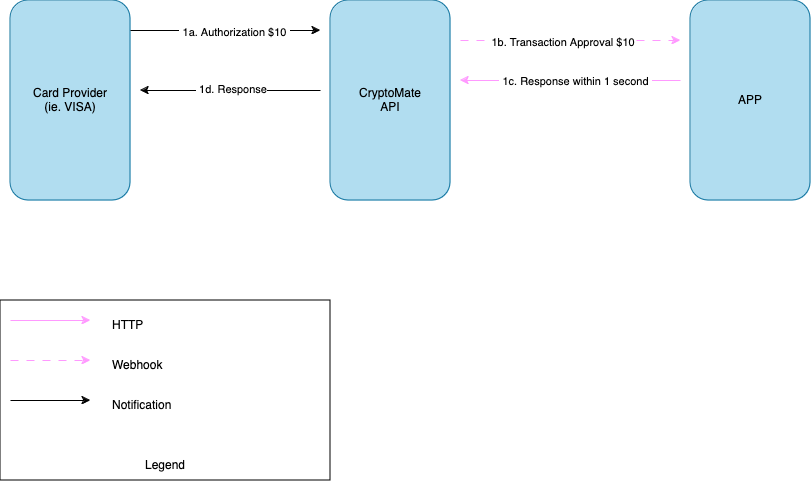
The request is composed by the following fields:
PRODUCT: CARDS
EVENT TYPE: AUTHORIZATION
STATUS: PENDING
Data Payload:
Field | Type | Description |
card_id | String | Unique identifier of the card that needs the approval |
bill_amount | Decimal with 2 digit precision | Amount of the operation will be billed on the system. Since all our cards are issued on USD, all transactions on the field will be on US Dollar |
bill_currency_number | Number | Currency expressed on ISO 4217 format |
bill_currency_code | String | Currency short name |
transaction_amount | Decimal with 2 digit precision | Amount of the operation that client is going to spend. This is the same value as show on the checkout/POS |
transaction_currency_number | Number | Currency expressed on ISO 4217 format |
transaction_currency_code | String | Currency short name |
exchange_rate | Number | If applied, the conversion rate applied to the amout. If not null will be sent. |
fees | Object | Information about the fees that are involved in the transaction |
merchant_data | Object | Information about the merchant that is involved in the transaction |
Fees payload:
Field | Type | Description |
atm_fees | Decimal with 2 digit precision | ATM fee charged to the transaction, if apply. Zero if no cost is incurred |
fx_fees | Decimal with 2 digit precision | Currency conversion fee charged to the transaction, if apply. Zero if no cost is incurred |
Merchant payload:
Field | Type | Description |
id | String | Unique identifier of the merchant |
name | String | Registered of the merchant |
city | String | City where the merchant is registered, could be null |
post_code | String | Postal code where the merchant is registered, could be null |
state | String | State where the merchant is registered, could be null |
country | String | Country where the merchant is registered. The country name is represented in 3 letter format ISO 3166-1 alpha-3. |
mcc_category | String | Category name that the merchant has be registered |
mcc_code | String | Numeric code of the category that merchant has be registered |
Full payload example:
{ "product": "CARDS", "event_type": "APPROVAL", "operation_id": "ca0c57d2-b1c9-4bcd-9d5d-8d361cad6fddds1c", "status": "PENDING", "data": { "card_id": "ivZPARvNBLOSZx69q4DCBBGUfVhCMsLw", "amount": 100.2, "currency_number": 840, "currency_code": "USD", "exchange_rate": null, "channel": "ECOMMERCE", "created_at": "2024-05-15T21:38:57.677Z", "fees": { "atm_fees": 0, "fx_fees": 0 }, "merchant_data": { "id": "311178830000", "name": "Amazon Es", "city": "Barcelona", "post_code": "16633", "state": "Cataluña", "country": "ESP", "mcc_category": "Electronics Stores", "mcc_code": "5732" } }}Response:
In order to approve the transaction a OK (HTTP 200) response is needed in less that 1 second (1000 ms) time and you must respond with a authorization response to know to approve or decline the transaction
Field | Type | Description |
response_code | String | Code that represent the result of the transaction.To approve a transaction, you can respond with 00. Otherwise, you may use any of the decline codes to decline the authorization. |
Response codes:
Code | Name | Description |
00 | Approved | Transaction approved and can be processed. |
51 | Insufficient funds | Respond with this code when the card has insufficient funds to cover the authorized amount. |
57 | Cardholder problem | Transaction is not permitted to the cardholder |
61 | ATM daily amount exceeded | The ATM withdrawal amount limit has been exceeded |
62 | ATM country not allowed | ATM withdrawal is not permitted in the merchant's country. |
77 | Merchant exclusion | The issuer does not participate in that merchant category. |
05 | Rejected by other reason | Transaction reject by any other reason that is not included on the others options |
Payload example:
{ "response_code": "00"}


On this page
- Card transaction approval