Experience API
The Experience APIs, also called Configuration APIs, are a suite of purpose-built APIs for retrieving your configuration data, which forms the foundation for driving personalized, relevant customer experiences.
With built-in localization support and flexible query parameters, they let you fetch tailored consent, preference, and other zero-party data configurations, giving you complete control over customer experiences, from granular, micro-level interactions to full-scale preference centers and everything in between.
Overview
Experience APIs are classified as follows:
- Profile Configuration
- Preference Configuration
Experience APIs drive the display of relevant consents, preference communications, feedback choices, and other data collection points. They're used alongside Data APIs, which retrieve an individual's most up-to-date information to populate those displays.
Whether you're building a Preference Center or an in-app widget to collect feedback, the interface layout is entirely up to you.
Working with Preference Communications and Consents
Experience APIs drive the display of relevant consents, preference communications, feedback choices, and other data collection points. They're used alongside Data APIs, which retrieve an individual's most up-to-date information to populate those displays.
Whether you're building a Preference Center or an in-app widget to collect feedback, the interface layout is entirely up to you.
Several APIs can display preference communications, depending on your use case. For example, to show preference communications based on a specific data point you know about an individual, or a segment they belong to, use the GET ProgramGroups by Custom Properties API. It returns all applicable preference communications, along with their frequency choices and preference attributes, in a single call.
Check out the video on configuring Program Groups in MyPreferences.
To display consents, use the GET Consents API to retrieve the list of all configured consents. Consents associated with contacts are always returned when you retrieve the Contact Types.
Once the configuration data is returned, link it to the actual user by retrieving their profile. Any known data point can look up a user, but the Profile ID or an Alternate ID gives the most accurate match.
Building a Preference Center
A personalized, intuitive Preference Center is key to a great user experience and to staying compliant with evolving data privacy standards. Whether you're building a dedicated Preference Center or embedding feedback and consent collection within your app, Experience APIs are central to delivering flexibility, consistency, and accuracy.
Step 1: Design the Layout — Your UI, Your Way
The visual layout and interaction model of your Preference Center are entirely customizable. Whether you're building a fully branded standalone experience or embedding modular components within an app or website, the APIs provide the data and structure and the design and UX strategy are yours.
Step 2: Display Preference Communications
Tailor preference communication options to what you know about the user. The GET ProgramGroups by Custom Properties API retrieves preference communications based on specific data points such as interests, region, and journey stage, so you can surface only the categories that apply to that individual.
Several APIs return preference communications, including frequency and related attributes; choose the one that fits your use case. The Programs API returns one or more individual programs, while the Program Groups API returns a specific category of programs.
Step 3: Display Consents
Use the GET Consents API to retrieve all consents configured in your system; consents tied to contact types are returned when you retrieve those contact types. Consents already associated with a user are automatically returned with their profile.
Together, this gives a clear view of which consents are required, optional, or already granted so users can make informed choices.
Step 4: Display Additional Data Points
Display any other data points you want to collect such as Groups, Custom Fields, Tags, and more, to better understand your users and tailor communications to their preferences.
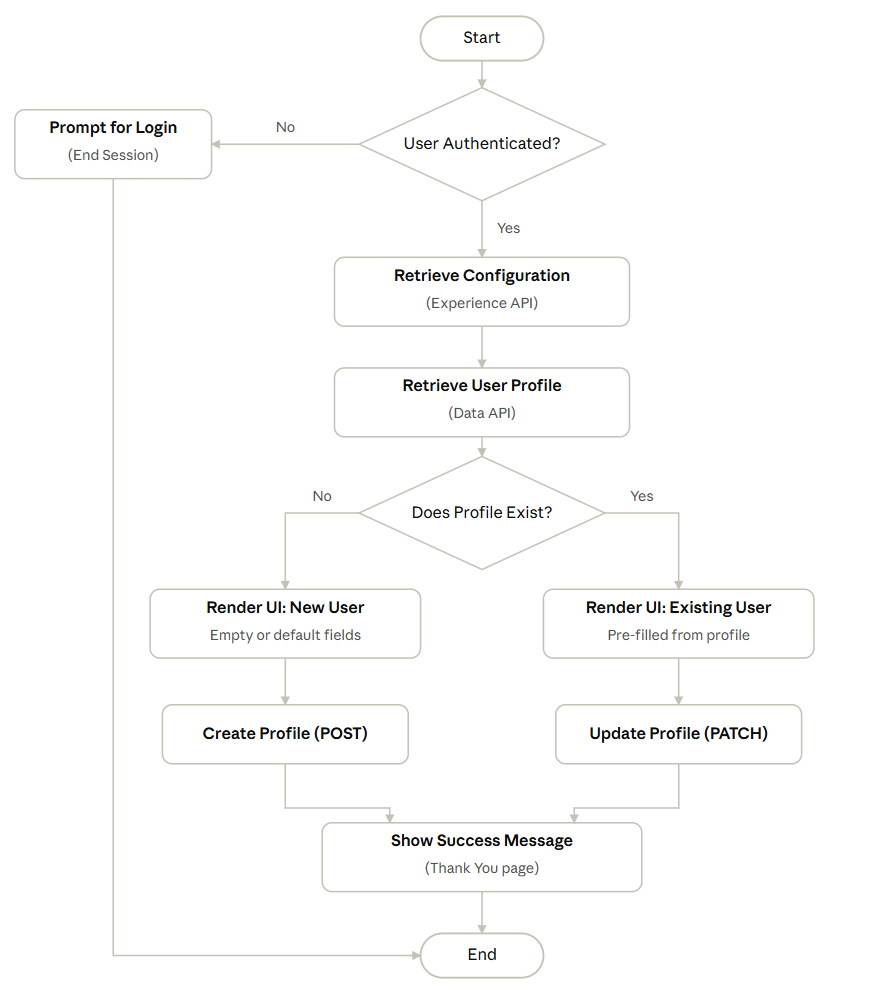
Step 5: Merge Configuration Data with the User Profile
Once you've retrieved all configuration data (available consents, preferences, custom fields, and so on), merge it with the individual's profile data to build the personalized experience.
Retrieve the profile with the GET Profile by ID endpoint, or look it up by an Alternate ID, email address, phone number, or other known data point.
This keeps the UI populated with data that's current and specific to the user, enabling real-time personalization and lets the user review and reaffirm the consents, permissions, and preferences they've previously set, keeping the experience transparent and aligned with their expectations.
Combining Experience APIs for front-end display with Data APIs for profile-level accuracy lets you build a Preference Center that's flexible, compliant, engaging, and user-first — a modular architecture that scales as your data strategy and user expectations grow.
Sample Preference Center Flow – Profile Identification & UI Handling


Endpoints
{clientId}/ConsentTypes
{clientId}/ConsentTypes?Id=Id&locale=locale&latestVersionOnly=latestVersionOnly
{clientId}/ConsentStatus
{clientId}/ConsentType/{typeId}
{clientId}/AddressTypes
{clientId}/AddressTypes?Id=Id&locale=locale
{clientId}/AddressType/{typeId}
{clientId}/AlternateIdTypes
{clientId}/AlternateIdTypes?Id=Id&locale=locale
{clientId}/AlternateIdType/{typeId}
{clientId}/CustomerTypes
{clientId}/CustomerTypes?Id=Id&locale=locale
{clientId}/CustomerType/{typeId}
{clientId}/EmailTypes
{clientId}/EmailType/{typeId}
{clientId}/EmailTypes?Id={typeId}&locale={localeId}
{clientId}/PhoneTypes
{clientId}/PhoneTypes?Id=Id&locale=locale
{clientId}/PhoneType/{typeId}
{clientId}/CustomFields/DateTime
{clientId}/CustomFields/DateTime?Id=Id&locale=locale
{clientId}/CustomFields/Numeric
{clientId}/CustomFields/Numeric?Id=Id&locale=locale
{clientId}/CustomFields/SelectList
{clientId}/CustomFields/SelectList?Id=Id&locale=locale
{clientId}/CustomFields/Text
{clientId}/CustomFields/Text?Id=Id&locale=locale
{clientId}/UpdateRules
{clientId}/CustomFields?Id=Id&locale=locale
{clientId}/CustomField/DateTime/{Id}
{clientId}/CustomField/Numeric/{Id}
{clientId}/CustomField/Text/{Id}
{clientId}/CustomField/SelectList/{Id}
{clientId}/GroupTypes
{clientId}/GroupTypes?Id=Id&locale=locale
{clientId}/GroupNames?Id=Id
{clientId}/GroupType/{typeId}
{clientId}/Groups/{groupType}/Update
{clientId}/Picklists
{clientId}/Picklists?Id=Id&locale=locale
{clientId}/Picklist/{Id}
{clientId}/Tags
{clientId}/Tags/{tagName}
{clientId}/Filters/{filterId}?locale={localeId}
{clientId}/Programs/{programId}?locale=string
{clientId}/Programs?locale=string
{clientId}/Programs/{programGroupId}/{programId}?locale={localeId}
{clientId}/Programs/ProgramTypes/{programTypeId}?locale={localeId}
{clientId}/Programs/IncludeMatching?locale=locale
{clientId}/Programs/IncludeAll
{clientId}/ProgramGroup?locale=localeId
{clientId}/ProgramGroup/{programGroupId}?locale=locale
{clientId}/ProgramGroup/IncludeMatching?locale=locale
{clientId}/ProgramGroup/IncludeAll?locale={localeId}