Cursor Integration
Connect the Similarweb MCP in Cursor (SSE)
Turn your Cursor into a traffic analyst. Build your apps & data analysis with Similarweb integrated, fetch fresh website traffic, compare sites, and turn answers into quick summaries or charts, without leaving Cursor.
**Setup instructions:**
1
Add New MCP in Settings
In cursor, go to: Settings —> MCP & Integrations —> Add Custom MCP This will open up a new mcp.json)
2
Paste the Similarweb MCP Config Json
API key
save
Plain text
{
"mcpServers": {
"similarweb-traffic-mcp": {
"command": "npx",
"args": [
"-y",
"mcp-remote@latest",
"https://mcp.similarweb.com",
"--header",
"api-key:YOUR_API_KEY"
]
}
}
}3
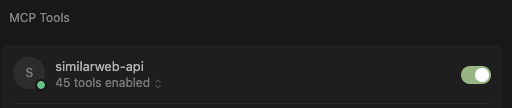
Verify the MCP is working
Make sure the mcp is turned on and the tools are enabled.
4
Try out prompts in your cursor environment
Competitor website traffic dashboard: "
Using data:
- Website Performance Metrics:
- Traffic volume and trends
- Audience demographics
- Traffic sources breakdown
- Geographic distribution
- Device usage patterns.
Provide actionable recommendations in a clear dashboard"
Analyze website traffic: “
Monthly marketing channel optimization: “
Key Use cases for Similarweb MCP in Cursor:
Integrate Similarweb data into your Cursor Apps
Analyze websites and companies when building CRM integrations
Create automated reports using Similarweb data
Security Measures
Do not share your API Key with anyone.
Store the API key in your global config (not in
**git**
).
Monitor your API usage to detect any unauthorized access
Enjoy!
Was this section helpful?
What made this section helpful for you?
What made this section unhelpful for you?


On this page
- Cursor Integration