Business eKYC
Understand the due diligence requirements and documentation necessary for onboarding corporate entities. This guide explains the verified data points required for businesses and their associated stakeholders.
Onboard business customers with confidence. The comprehensive KYC/B capabilities verify company legitimacy and ownership structures and ensure compliance with AML regulations—directly within the MatchMove platform.
Corporate Registry Check
Instant access to 600M+ commercial records worldwide. Verify company registration, legal status, and corporate details in just 15 seconds through the integrated registry network.
UBO and Associated Parties Verification
Identify and verify Ultimate Beneficial Owners with access to 345M+ shareholder records. The KYC service UBO verification achieves 90%+ pass rates with minimal friction.
Document Review
AI-powered extraction and verification of corporate documents in 140+ languages. Certificates of incorporation, articles of association, shareholder registers, and more.
Ownership Structure
Automatically map complete ownership hierarchies including shareholders, directors, authorized signatories, and related legal entities with visual structure diagrams.
Associated Parties We Verify
- Ultimate Beneficial Owners
- Shareholders
- Directors
- Representatives
- Authorized Signatories
- Founders
- Secretaries
- Legal Advisors
- Trustees
- Beneficiaries
How Business Verification Works
1
Company Information Submission
The business representative enters basic company details: legal name, registration number, and country of incorporation. The KYC service system searches against 600M+ commercial records to locate and pre-fill company data.
2
Corporate Registry Verification
We automatically verify the company's legal existence, registration status, and corporate details against official government registries and trusted commercial databases in real time.
3
Corporate Document Collection
Required documents are uploaded: certificate of incorporation, articles of association, shareholder registers, and proof of address. The KYC service AI extracts and cross-checks data in 140+ languages.
4
Ownership Structure Mapping
The complete ownership hierarchy is mapped—identifying all shareholders, directors, and Ultimate Beneficial Owners (UBOs) who hold 25% or more ownership or exercise significant control.
5
UBO & Associated Party KYC
Each identified UBO and key associated party completes individual identity verification (eKYC). This ensures the real people behind the business are verified to the same standard as individual customers.
6
Corporate AML Screening
The company and all associated parties are screened against global sanctions lists, PEP databases, watchlists, and adverse media. Any matches are flagged for compliance review.
7
Verification Complete
Upon successful verification, the business is approved for onboarding. A complete audit trail is generated, and ongoing monitoring ensures continuous compliance throughout the relationship.
AML Screening & Ongoing Monitoring
Protect your business with continuous compliance monitoring that runs automatically in the background—built right into your existing workflows.
Global Watchlist Screening
Automated checks against OFAC, UN, EU, HMT sanctions lists and more
PEP Detection
Identify Politically Exposed Persons across all jurisdictions
Adverse Media Monitoring
AI-powered scanning for negative news coverage
Ongoing Monitoring
Continuous re-screening alerts you to any status changes
Risk Scoring
Dynamic assessment based on multiple configurable risk factors
Security & Compliance
The KYC service verification infrastructure meets the highest security standards including SOC 2 Type II certification and GDPR compliance. All verification data is encrypted end-to-end and processed in accordance with global data protection regulations.
Business eKYC User Journey
Designing a seamless eKYC (Electronic Know Your Customer) journey requires a delicate balance between regulatory rigor and user experience. While the interface is designed to feel intuitive and linear, the engine behind it is highly sophisticated.
The following workflow outlines the standard sequence of screens a business user will encounter. However, it is important to note that the capture process is dynamic; the system adapts in real-time based on the business:
- country of business foundation
- industry or sector
- risk associated with the profile
If certain triggers are met, the journey will automatically scale to include Enhanced Due Diligence (EDD) requirements, prompting for additional documentation or clarifying questions to ensure full compliance without compromising the integrity of the data.
Key Logic of the Journey
- Adaptive UX: The flow isn't one-size-fits-all; it adjusts based on the "foundation country" and "industry" inputs.
- Risk-Based Triggering: High-risk industry and profiles will see additional form fields that a standard-risk business user will not.
- Dynamic Document Capture: The system intelligently requests specific IDs or supplemental proof that is legally required for verification.
Disclaimer

Verification Entry

Business Profile
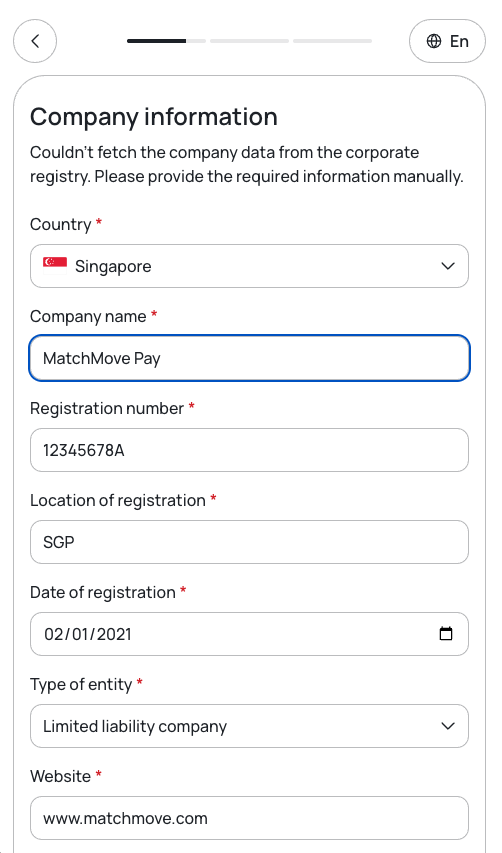
Document Capture

Declare Associated Parties
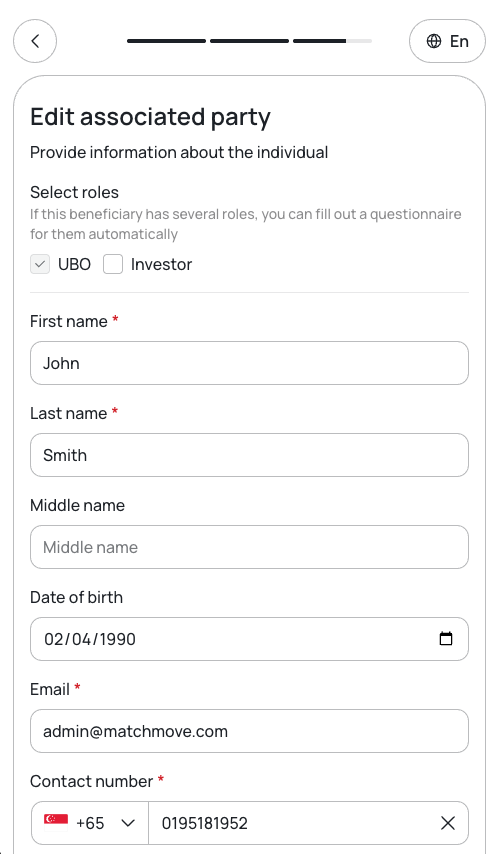
Submission

Confirmation
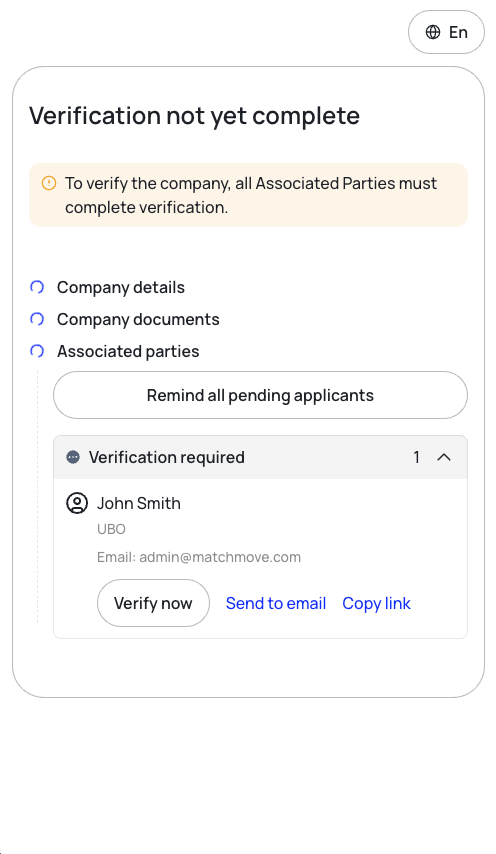
*Before the business KYC verification is given approval, all of its connected parties must pass their own verifications.
UBO and other associated parties must complete their individual eKYC using the verification link sent to their registered email.
Note:
Starting a KYC from a link sent to your email requires a relationship and trust from the sender. As such, the sending of the KYC email to associated parties must be a deliberate action from the verifying business. The KYC links for the associated parties are provided in the business KYC confirmation screen and can also be generated using the API.
The platform will not send any automated emails pertaining to KYC; all platform notifications are delivered only through a webhook.
KYC and Business User State Transition
As users navigate the KYC process, their account statuses dynamically update to reflect their current stage in the onboarding journey. This guide details every user state transition, providing you with a clear roadmap of what each status means and the specific actions required to move users forward. Familiarize yourself with these transitions to ensure seamless user activation and responsive account management.
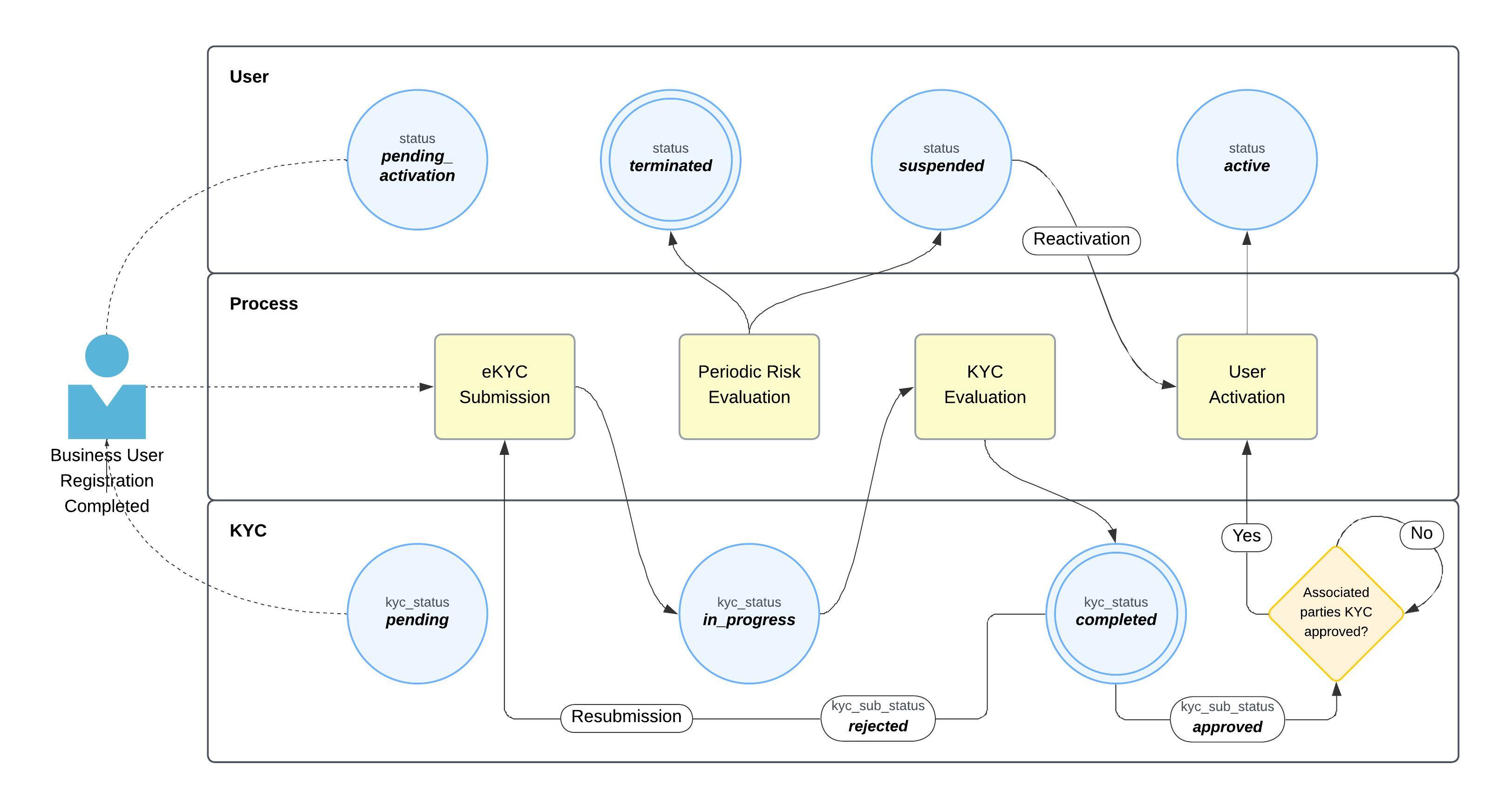
Business eKYC Workflow
- Profile Completion: Once the user completes their profile, their
user.statusupdates topending_activationand theiruser.kyc_statusupdates topending. To activate the account, the user must now undergo eKYC. - KYC Submission: Upon eKYC submission, the
user.kyc_statustransitions toin_progress. This automatically triggers the KYC evaluation process. - Evaluation Completion: Once the evaluation concludes, the
user.kyc_statusupdates tocompleted. - Associated Party Evaluation:
- The final approval of a business KYC application is directly dependent on the verification of its linked associated parties. A business profile cannot be fully approved until all required associated parties have successfully passed their own KYC evaluations.
- Evaluation Results: Based on the review, the
user.kyc_sub_statuswill be marked as eitherapprovedorrejected.- If Rejected: Prompt the user to correct the specified rejection reasons and resubmit their eKYC application.
- If Approved and Associated Parties KYC are Approved: This triggers the platform-initiated User Activation process. The user is now granted access to the platform's financial assets and capabilities.
- If Approved and Associated Parties KYC are Not Approved: The platform will wait until all the required approvals are given before it triggers the platform-initiated User Activation process.
- Ongoing Monitoring: A periodic risk evaluation occurs throughout the lifetime of the user's account. Based on these evaluations, the
user.statuscan be updated tosuspended(a reversible action) orterminated(an irreversible action). - Account Reactivation: If an account is suspended, the partner can initiate a reactivation process once the underlying suspension reason has been fully resolved.
KYC and Business User State Transition Updates
Because KYC evaluation is an asynchronous process, all status updates are delivered securely via the USER.STATUS (Business) and ASSOCIATED_PARTIES.PROFILE.STATUS (Business - Associated Parties) webhooks. Each webhook payload provides the real-time user and KYC states to keep your system in sync. You must monitor these incoming updates and trigger the appropriate next steps or follow-up actions based on the specific states returned.
|
|
|
| [B] Complete the profile questionnaire. |
|
|
|
| No action required. |
|
|
|
| [B] Upload document requirements. |
|
|
|
| No action required. |
|
|
|
| [B] Add business-associated parties. |
|
|
|
| No action required. |
|
|
|
| Associated party completing their KYC requirements. |
|
|
|
| Associated party completing their KYC requirements. |
|
|
|
| [B] Complete the business industry questionnaire. |
|
|
|
| No action required. |
|
|
|
| Manual document review activated — waiting for KYC service review results. |
|
|
|
| No action required. |
|
|
|
| No action required. |
|
|
|
| [B] EDD activated — complete the EDD questionnaire. |
|
|
|
| No action required. |
|
|
|
| [B] EDD activated — complete the high-risk industry questionnaire. |
|
|
|
| No action required. |
|
|
|
| [B] EDD activated — complete the license verification questionnaire. |
|
|
|
| No action required. |
|
|
|
| [B] EDD activated — complete the source of funds questionnaire. |
|
|
|
| No action required. |
|
|
|
| [B] EDD activated — complete the PEP questionnaire. |
|
|
|
| No action required. |
|
|
|
| [B] EDD activated — complete the sanction questionnaire. |
|
|
|
| No action required. |
|
|
|
| EDD activated - waiting for manual MatchMove Compliance approval. |
|
|
|
| The user has been activated. [P] Proceed with financial asset provisioning for the business user. |
|
|
|
| The KYC submission has been rejected. [P] Allow the user to invoke eKYC again [B] Resubmit the eKYC and resolve the rejection reason. |
|
|
|
| The user has been terminated as a result of KYC and risk evaluation. [P] Notify the user regarding the termination. |
|
|
|
| Business user suspended as a result of periodic risk evaluation. [P] Raise a support ticket to MatchMove providing the user ID of the suspended user. |
KYC Rejection Reasons - Business
| Know Your Business (KYB) not approved. |
|---|---|
| Mandatory business information is missing or incomplete. |
| The document expires within the minimum validity period required. |
| The document image is unreadable. |
| The document shows signs of tampering or forgery. |
| Registered business name does not match the application. |
| The issuing country of the document is not supported. |
| The document is past its validity date. |
| The region of registration or operation is not serviceable. |
| Country of incorporation does not match the country declared. |
| A required business document was not submitted. |
| The business registration has lapsed. |
| No director or beneficial owner could be identified. |
| Business address does not match the documents. |
| An associated party has not completed verification. |
| An associated party record has not been created. |
| Document type submitted differs from the type required. |
| The document language is not supported. |
| Company details do not match registry records. |
| The document is older than the maximum age allowed. |
Related Links
On this page
- Business eKYC