Begin technical integration
This guide provides a comprehensive overview of the technical requirements, security protocols, and architectural structure for integrating with the MatchMove API ecosystem.
API Authorization & Access Scopes
The API utilizes a dual-layered authorization model to ensure that requests are both authenticated and correctly scoped to the intended data level.
Partner IP whitelisting
Before you begin consuming the API, we need to make sure that the middleware static IP has already been whitelisted from the MatchMove network securitty.
Otherwise, you will receive a 403: Forbidden response when you attempt to call an API.
Authentication Mechanism
All requests must use Basic Authentication.
This involves passing your unique consumerKeyand consumerSecret in the HTTP header.
Header: Authorization: Basic <base64(consumerKey:consumerSecret)>
Access Scopes
Access is divided into two distinct levels. Your application must determine the scope based on the endpoint's purpose:
User Scope
Used for actions tied to a specific end-user (e.g., checking a card balance or initiating a payout).
Requirement:
- Header: Basic Authentication
- Header:
X-Auth-User-ID(User Identifier or user.ID) - URL:
program_code - URL: correct module hostname or base URL
Admin Scope
Used for broad (non-user-specific) program management (e.g., pulling partner-level reports or platform configurations).
Requirement:
- Header: Basic Auth
- URL:
program_code - URL: correct module hostname or base URL
The program_code is a mandatory parameter that identifies your specific program in the platform. This identifier will be assigned to your program during the stack setup and program configuration stage.
Add end user context
The MatchMove Banking API requires four auth context headers: X-Auth-User-IP, X-Auth-Device-ID, X-Auth-User-Agent, and X-Auth-User-ID. The first three travel on every request, while X-Auth-User-ID is required only on user-scoped calls that act on behalf of a specific individual or business user.
| Public Internet Protocol (IP) address of the end user's device, as seen from the public internet. IPv4 or IPv6. |
|
| Stable identifier for the device or browser installation. |
|
| Identifier for the client application and runtime environment. |
|
| Identifier of the individual or business user in the MatchMove platform that the request acts on behalf of. Required on user-scoped calls only. |
|
The Capture End User Context guide covers how to source each value correctly on Android, iOS, and web, and how to attach them through a single interception point.
API Base URL Architecture
To provide high availability and modularity, hostnames are segregated by product or capability type. You must route your API calls to the specific base URL corresponding to the service you are utilizing.
UAT (User Acceptance Testing)
Used for development, staging, and certification.
Identity
| User onboarding, KYC, and KYB-related API | |
|---|---|---|
Accounts
| Accounts or wallets, virtual account, and wallet transaction-related API | |
Cards
| Cards and card transaction-related API | |
Collection
| Collections or incoming transfer-related API | |
Payouts
| Domestic and cross-border payout or outgoing transfer-related API | |
Platform
| Admin-related and general-purpose APIs, such as webhooks | |
Simulations (Collection)
| Collection transaction simulation-related API. Only available in the staging environment. | |
Simulations (Cards)
| Collection authentication and authorization simulation-related API. Only available in the staging environment. |
Live (Production or Live)
Used exclusively for live, real-world financial transactions.
Identity
| User onboarding, KYC, and KYB-related API | |
Accounts
| Accounts or wallets, virtual account, and wallet transaction-related API | |
Cards
| Cards and card transaction-related API | |
Collection
| Collections or incoming transfer-related API | |
Payouts
| Domestic and cross-border payout or outgoing transfer-related API | |
Platform
| Admin-related and general-purpose APIs, such as webhooks |
API Request Example
A standard request for a user-specific action in the UAT environment:
Request (Admin scope) using {{identity_base_url}}
curl --location 'https://api-sg-identity.matchmove-beta.com/{{program_code}}/v1/users/enumerations/countries' \
--header 'Authorization: ••••••'
Response (Admin scope)
{
    "countries": [
        {
            "code": "AFG",
            "description": "Afghanistan"
        },
        {
            "code": "ALA",
            "description": "Aland Islands"
        },
        {
            "code": "ALB",
            "description": "Albania"
        },
..
Request (User scope) using {{identity_base_url}}
curl --location 'https://api-sg-identity.matchmove-beta.com/{{program_code}}/v1/users' \
--header 'X-Auth-User-ID: {{user_id}}' \
--header 'Authorization: ••••••'
Response (User scope)
{
    "id": "6ea4a36ac4984065bf5d4eefa4b756b9",
    "email": "john.smith@matchmove.com",
    "title": "",
    "name": {
        "first": "John",
        "middle": "",
        "last": "Smith",
        "preferred": "John Smith"
    },
..
Technical Implementation Workflow
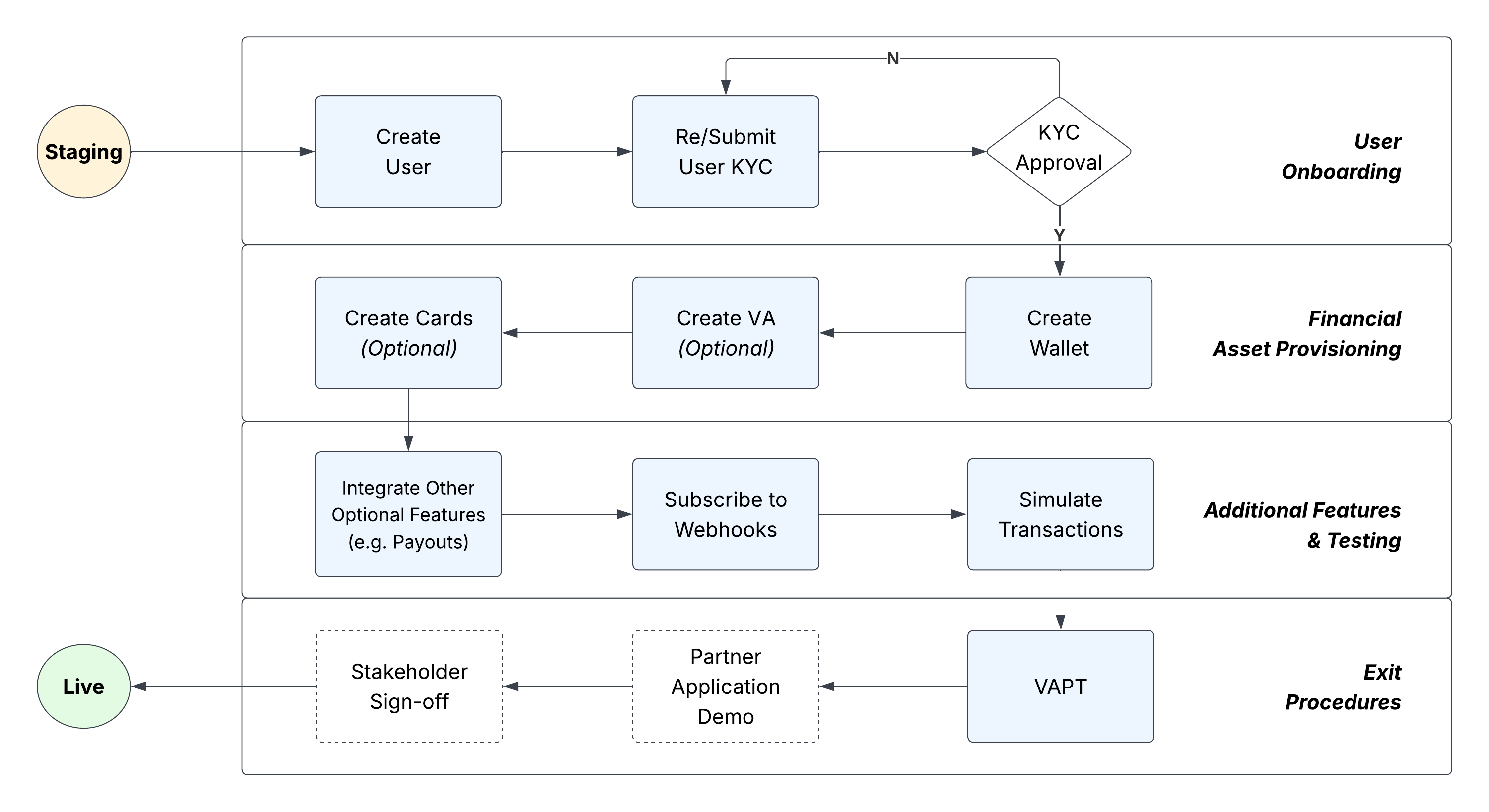
The "Technical Implementation Workflow" diagram outlines the end-to-end journey for integrating new partners into the financial platform. It maps out the critical transition from initial testing in a secure staging environment to a fully operational live deployment. Structured across four distinct phases, this workflow ensures security, compliance, and functional readiness before the final launch.
Here is the step-by-step breakdown of the integration process:
- User Onboarding: The process begins once the staging environment is handed over, starting with the creation of a user profile and submitting it for KYC (Know Your Customer) approval.
- Financial Asset Provisioning: Once KYC is approved, the system provisions financial assets by creating a wallet, with optional steps for generating virtual accounts (VA) and cards.
- Additional Features & Testing: Developers then integrate additional features, subscribe to webhooks, and rigorously simulate transactions to ensure system stability.
- Exit Procedures: The final readiness checks involve a Vulnerability and Penetration Test (VAPT) followed by a partner application demo.
- Go-Live: After securing the final stakeholder sign-off, the fully vetted application transitions out of staging and into the live environment.
Figure 1: Technical Implementation Workflow diagram
Related Links
On this page
- Begin technical integration