Assisted 3DS authentication - OTP 2FA
Learn about our Assisted 3DS authentication model — One-time Password (OTP) 2FA, where your platform participates in the authentication flow. This guide explains your role in managing the user challenge process for securing online transactions by utilizing your existing communication channels to serve the OTP.
Note:
Please be aware that this feature requires a specific change to your program's configuration before it can be enabled. It is not activated by default for new or existing programs. Reach out to your MatchMove Implementation or Sales team to learn more and initiate the setup process.
Both Assisted 3DS authentication models use a hybrid approach where MatchMove sends a security code to the partner via a webhook, but they take entirely different paths for the final user verification:
- Assisted 3DS (OTP): Focuses on Code Delivery In this model, MatchMove handles the security and generation of a One-Time Password (OTP). The partner’s responsibility is strictly last-mile delivery. They take the OTP provided by the webhook and pass it directly to the cardholder through their own channels (like SMS or email) so the user can complete a standard code challenge.
- Assisted 3DS (Biometric 2FA): Focuses on Native Verification Instead of passing a code to the user, the partner takes full control of the authentication challenge. The webhook acts as a silent trigger, prompting the partner to initiate a native biometric check (like Face ID or a fingerprint) within their app, where the user simply approves or rejects the payment. The security code is never shown to the user; it is only used on the backend to authorize the transaction once the biometric check passes.
How It Works: OTP Authentication Flow
- Challenge Initiated: The platform detects that a transaction requires 3DS verification and presents the cardholder with the OTP authentication challenge page.
- OTP Generation: The platform creates a secure, time-sensitive One-Time Password (OTP).
- Webhook Handoff: Instead of directly messaging the user, the platform instantly sends a webhook containing the OTP and transaction details to the partner’s server.
- Partner Delivery: Upon receiving the webhook, the partner immediately delivers the OTP to the cardholder using their preferred communication channel (SMS, Email, or In-App Push).
- Final Verification: The cardholder enters the received code. The platform validates the OTP and, if correct, proceeds with transaction authorization.
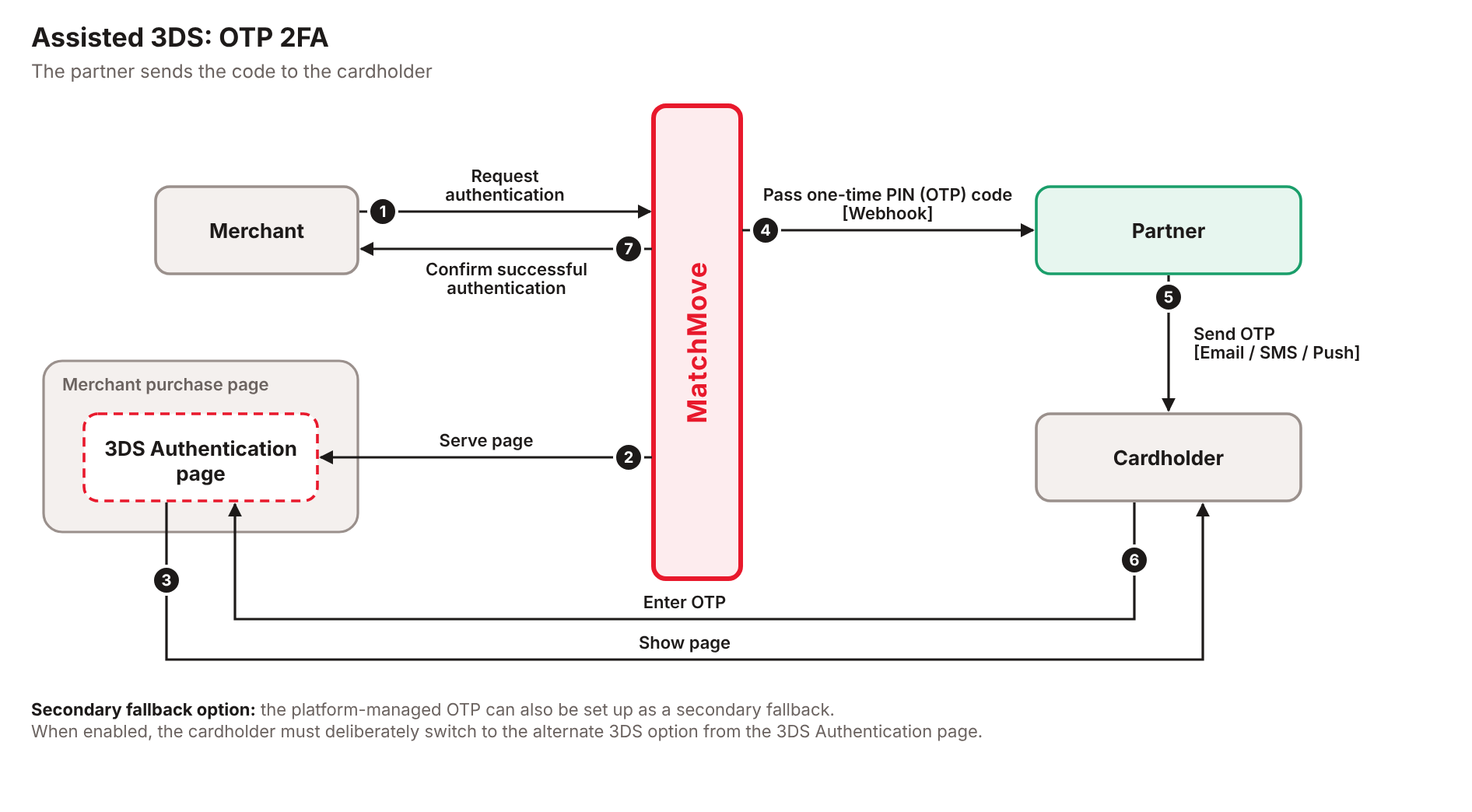
Getting Started with Assisted 3DS Authentication
Assisted 3DS Authentication (both OTP and Biometric 2FA) is an OPTIONAL service available for new and existing partners.
- Default Behavior: Without this service enabled, MatchMove is solely responsible for delivering the standard 3DS OTP to the enabled delivery channels.
- Assisted 3DS Enabled: When this service is activated, the partner takes control of the authentication experience. Depending on your configuration, you can either take over the direct delivery of the 3DS OTP to your cardholders or participate in a seamless native biometric challenge within your application.
1
Enable OTP 2FA in the program configuration
Partners who want to enable Assisted 3DS Authentication - OTP 2FA should contact the MatchMove Implementation team and request to set up and configure it in the platform configuration.
2
Subscribe to the 3DS Authentication webhook
Once the service is enabled in the configuration, partners must subscribe to the webhook event CARDS.3DS.AUTHENTICATION.
This webhook will deliver a payload containing the card ID and transaction 3DS from a payment authentication request.
Upon receipt of theCARDS.3DS.AUTHENTICATION webhook, the partner must consume the payload and prepare for the OTP delivery to their customer.
Sample webhook payload
3DS Authentication webhook payload
3DS Authentication webhook payload
{
    "entities": {
        "card": {
            "id": "9b087b1d479aabd6af63f7d699f25fcc",
            "type": "{{card_type}}"
        },
        "transaction": {
            "authentication": {
                "id": "019f4109-6285-76f3-9201-60c8b6f52af2",
                "challenge_priority": 1,
                "created_at": "2026-07-08T17:22:41+08:00",
                "details": {
                    "channel": "email",
                    "otp": "123456",
                    "otp_expires_at": "2026-07-08T17:25:48+08:00",
                    "otp_generated_at": "2026-07-08T17:22:48+08:00"
                },
                "expires_at": "2026-07-08T17:32:41+08:00",
                "method": "otp",
                "retry_count": "0"
            },
            "merchant": {
                "merchant_name": "Amazon"
            },
            "network": "MASTER",
            "transaction_amount": "184.00",
            "transaction_currency": "AED"
        },
        "user": {
            "email": "test@matchmove.com", //dummy value
            "id": "9a3f91d0ab3d1db5a97716f0efe5a96c",
            "mobile": "9876543210",// dummy value
            "mobile_country_code": "1",
            "type": "BUSINESS"
        }
    },
    "entity_id": "019f4109-6285-76f3-9201-60c8b6f52af2",
    "entity_type": "CARD",
    "event_timestamp": "2026-07-08T09:22:48Z",
    "message_id": "019f4109-7cd1-7536-9b51-8432b0397c01",
    "program_code": "{{program_code}}",
    "version": "v2",
    "webhook_event": "CARDS.3DS.AUTHENTICATION"
}
Legacy 3DS Authentication webhook payload
Legacy 3DS Authentication webhook payload
This legacy payload remains supported for select partners in specific regions.
{
    "entities": {
        "card": {
            "id": "defa202f9a61576f3a434b7ccd994c69",
            "type": "{{card_type}}"
        },
        "transaction": {
            "authentication": {
                "channel": "sms",
                "created_at": "2026-07-10T17:41:38+08:00",
                "id": "91b16015a1794204a6f2c7e4c646f319",
                "method": "otp",
                "otp": "123456",
                "otp_expires_at": "2026-07-10T17:46:38+08:00",
                "otp_generated_at": "2026-07-10T17:41:38+08:00",
                "retry_count": "0"
            },
            "merchant": {
                "merchant_name": ""
            },
            "network": "MASTERCARD",
            "transaction_amount": "",
            "transaction_currency": ""
        },
        "user": {
            "email": "test@matchmove.com", // dummy value
            "id": "6dfd16a179e94728b843eafbac92bf17",
            "mobile": "9912345978", // dummy value
            "mobile_country_code": "63"
        }
    },
    "entity_id": "91b16015a1794204a6f2c7e4c646f319",
    "entity_type": "CARD",
    "event_timestamp": "2026-07-10T09:41:38Z",
    "message_id": "d9adf23e8eac44a697cd37a9514b9010",
    "program_code": "{{program_code}}",
    "version": "v2",
    "webhook_event": "CARDS.3DS.AUTHENTICATION"
}
3
Deliver the 3DS OTP (received from the webhook) to your customer
The authentication code received from the webhook must be passed or delivered to the cardholder through the allowed channels.
Allowed 3DS OTP delivery channels:
- SMS
- Email
- Push notification via the Partner app
4
Validate your integration
There are simulation APIs available that can be used to test Assisted 3DS Authentication - OTP 2FA in the staging environment.
You can go to the Simulate Assisted 3DS Authentication - OTP 2FA section to learn more about the simulation procedures.
Related Links
On this page
- Assisted 3DS authentication - OTP 2FA