Individual eKYC
Understand the identity verification standards and prerequisite documents required for onboarding retail users. This guide provides a comprehensive overview of the compliance framework and data structures needed for individuals.
Verify your customers quickly and securely with our comprehensive individual verification suite. From document checks to biometric authentication, the MatchMove platform provides multiple layers of identity assurance—all accessible through a single integration point.
Document Verification
AI-powered verification of passports, national IDs, driver's licenses, and residence permits from 220+ countries. The OCR technology extracts data in 40+ languages with built-in fraud detection.
Biometric Liveliness
Advanced 3D face mapping confirms users are real and present. The system detects deepfakes, masks, photos, and screen presentations with 99%+ accuracy—meeting iBeta Level 2 compliance standards.
Non-Doc Verification
Verify identities in as little as 4.5 seconds without document uploads. The platform cross-references government databases in 10+ countries for frictionless onboarding while maintaining full compliance.
Address Verification
Validate proof of address documents, including utility bills, bank statements, and government correspondence. Processing completes in under 1 minute regardless of document language.
KYC Verification Methods
To ensure secure and compliant user onboarding, the platform offers flexible Know Your Customer (KYC) options. Depending on your integration requirements, regional availability, and user eligibility, you can utilize the following verification methods:
1. Document-Based Verification This is the standard verification method where uploaded KYC documents are used to verify that a user profile is legitimate or valid. In this method, the user profile is provided and established before the KYC process starts.
- Process: The user uploads their required physical or digital KYC identity documents (such as a passport, standard government ID, or driver's license).
- Submission: The complete KYC application, including the uploaded document images and the pre-existing user profile data, is submitted through the MatchMove API.
- Verification: The risk and KYC verification processes are aided by automated eKYC verifications on the submitted documents. The final verification decision and approval are made by the Financial Institution.
2. Authentication-Based Verification This method relies on a trusted third party or institution. It asks users to grant access to their already authenticated data, uses that data to update the user profile, and trusts that data as KYC-verified data.
- Primary Authentication: The user is asked to grant access to their verified identity data held by a trusted third-party institution or platform.
- Profile Update: Once access is granted, MatchMove automatically collects this external data and updates the user's profile, trusting it as KYC-verified data.
- Verification: The Financial Institution conducts the risk profiling based on this authenticated data and makes the final decision on approval.
KYC Verification Workflows
Document-based verification
Document-based verification
How Document-based verification works
1
User Initiates Verification
The user begins the verification process within your platform. They consent to data processing and select their country of residence to ensure the correct document types are presented.
2
Identity Document Upload
The user captures or uploads a photo of their government-issued ID (passport, national ID card, driver's license, or residence permit). The KYC service can support 14,000 document types across 220 countries. However, availability of document types for a region will follow global risks and compliance reviews.
3
AI-Powered Document Analysis
The KYC service AI instantly extracts data using OCR technology, verifies document authenticity by checking security features, detects tampering or forgery attempts, and validates the document hasn't expired.
4
Biometric Liveness Check
The user takes a selfie or short video. The 3D face mapping technology confirms they are a real, live person (not a photo, deepfake, or mask) and matches their face to the ID document photo.
5
Risk Profiling & Screening
The verified identity is automatically screened against global sanctions lists, PEP databases, and adverse media sources, with risk scores calculated based on configurable parameters. If a user is flagged as high-risk, an Enhanced Due Diligence (EDD) workflow is activated. This prompts the user to provide additional information or supplementary documents to determine whether the risk alert is a false positive or if an exemption can be granted to allow them to proceed.
6
Verification Complete
Results are returned in seconds. Approved users proceed immediately; flagged cases are routed to your compliance team for review. All data is securely stored for audit purposes.
Individual Document-based Verification User Journey
Designing a seamless eKYC (Electronic Know Your Customer) journey requires a delicate balance between regulatory rigor and user experience. While the interface is designed to feel intuitive and linear, the engine behind it is highly sophisticated.
The following workflow outlines the standard sequence of screens a regular user will encounter. However, it is important to note that the capture process is dynamic; the system adapts in real-time based on the user:
- country of residence
- risk associated with the profile
If certain triggers are met, the journey will automatically scale to include Enhanced Due Diligence (EDD) requirements, prompting for additional documentation or clarifying questions to ensure full compliance without compromising the integrity of the data.
Key Logic of the Journey
- Adaptive UX: The flow isn't one-size-fits-all; it adjusts based on the "residency" inputs.
- Risk-Based Triggering: High-risk profiles will see additional form fields that a standard-risk user will not.
- Dynamic Document Capture: The system intelligently requests specific IDs or supplemental proof that is legally required for verification.
Disclaimer

Verification Entry

Document Selection

*Document type availability per region is subject to MatchMove Compliance review.
Document Capture

Liveliness Detection (through video selfie)

Individual Profile

Proof of Address Upload

Submission

Confirmation

*Result may be given instantly If there are no issues on the documents submitted or if there are no any outstanding evaluation required for the individual profile.
Authentication-based verification
Authentication-based verification
How Authentication-based verification works
1
User Initiates Verification
The user begins the verification process within your platform. Instead of being prompted to upload physical documents, they are directed to verify their identity via an integrated, trusted third-party or government-backed institution.
2
Third-Party Authentication & Consent
The user is seamlessly routed to the external institution's secure portal. They log in and explicitly grant permission for their already-authenticated identity data to be shared for KYC purposes.
3
Secure Data Retrieval
Once consent is granted, the system securely connects to the third-party platform. MatchMove automatically extracts the user's verified identity attributes directly from the trusted source.
4
Automated Profile Update
Because this external data comes from a trusted institution, it is inherently accepted as KYC-verified data. MatchMove uses this data to automatically populate and update the user's profile, completely eliminating the need for manual data entry or physical document uploads.
5
Risk Profiling & Screening
The updated, authenticated profile data is automatically screened against global sanctions lists, PEP databases, and adverse media sources. The Financial Institution then conducts its internal risk profiling based on this trusted data.
6
Verification Complete
The final KYC submission is processed in seconds. Approved users proceed immediately, with the final verification decision and approval handled directly by the Financial Institution. All data is securely stored for audit purposes.
Individual Authentication-Based User Journey
Designing a seamless Authentication-Based KYC journey requires a delicate balance between regulatory rigor and user experience. While the interface is designed to feel entirely frictionless—often requiring just a few clicks for the user to grant access—the engine behind it securely orchestrates and validates data from trusted third-party institutions.
The following workflow outlines the standard sequence of screens a user will encounter when linking their previously authenticated data. However, it is important to note that the process remains dynamic; the system adapts in real-time based on the user's:
- country of residence
- risk associated with the profile
If certain risk triggers are met during the automated screening phase, the journey will automatically scale to include Enhanced Due Diligence (EDD) requirements. This will prompt the user for supplementary documentation or clarifying questions to ensure full compliance, correctly ascertaining if a risk hit is a false positive or if an exemption can be granted.
Key Logic of the Journey
- Frictionless Data Retrieval: Instead of manual document capture, the system securely extracts verified identity attributes directly from the trusted institution to instantly update the user profile.
- Adaptive UX: The flow dynamically adjusts based on the user's platform eligibility and the specific data points provided by the third-party authenticator.
- Risk-Based Triggering: Profiles flagged as high-risk during the automated screening will trigger EDD, presenting additional form fields or supplementary document requests that a standard-risk user will entirely bypass.
Third-Party KYC Entry
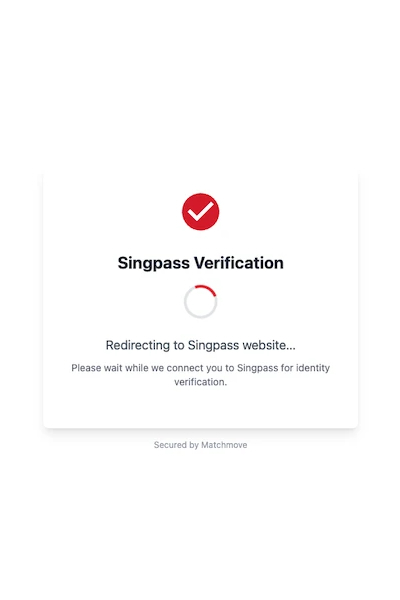
QR Authentication; or
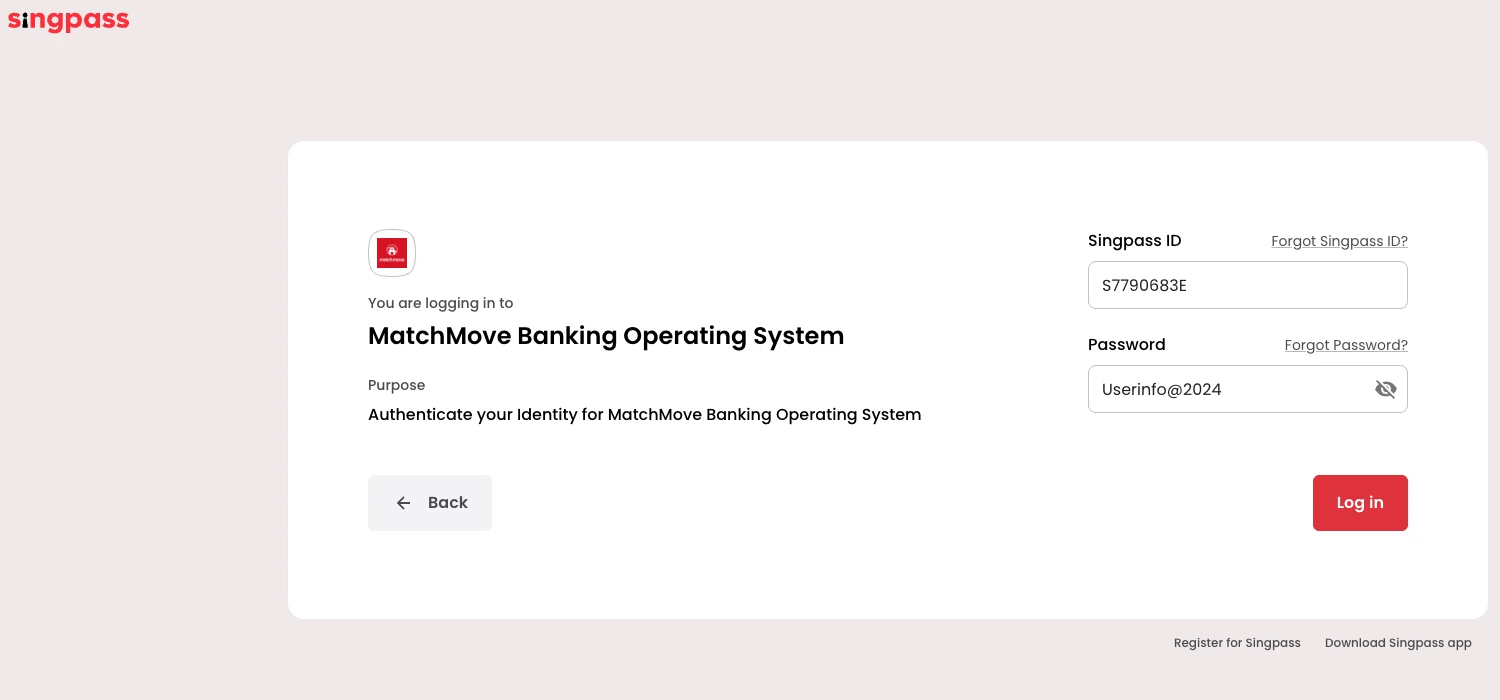
Password Authentication

Data Access Consent
Add description here

Data Sharing Review
Add description here

Data Sharing Review
Add description here

Data Sharing Review
Add description here

Data Collection
Add description here

Risk Evaluation and Approval
Add description here

AML Screening & Ongoing Monitoring
Protect your business with continuous compliance monitoring that runs automatically in the background—built right into your existing workflows.
Global Watchlist Screening
Automated checks against OFAC, UN, EU, HMT sanctions lists, and more
PEP Detection
Identify Politically Exposed Persons across all jurisdictions
Adverse Media Monitoring
AI-powered scanning for negative news coverage
Ongoing Monitoring
Continuous re-screening alerts you to any status changes
Risk Scoring
Dynamic assessment based on multiple configurable risk factors
Security & Compliance
The KYC service verification infrastructure meets the highest security standards, including SOC 2 Type II certification and GDPR compliance. All verification data is encrypted end-to-end and processed in accordance with global data protection regulations.
KYC and Individual User State Transition
As users navigate the KYC process, their account statuses dynamically update to reflect their current stage in the onboarding journey. This guide details every user state transition, providing you with a clear roadmap of what each status means and the specific actions required to move users forward. Familiarize yourself with these transitions to ensure seamless user activation and responsive account management.
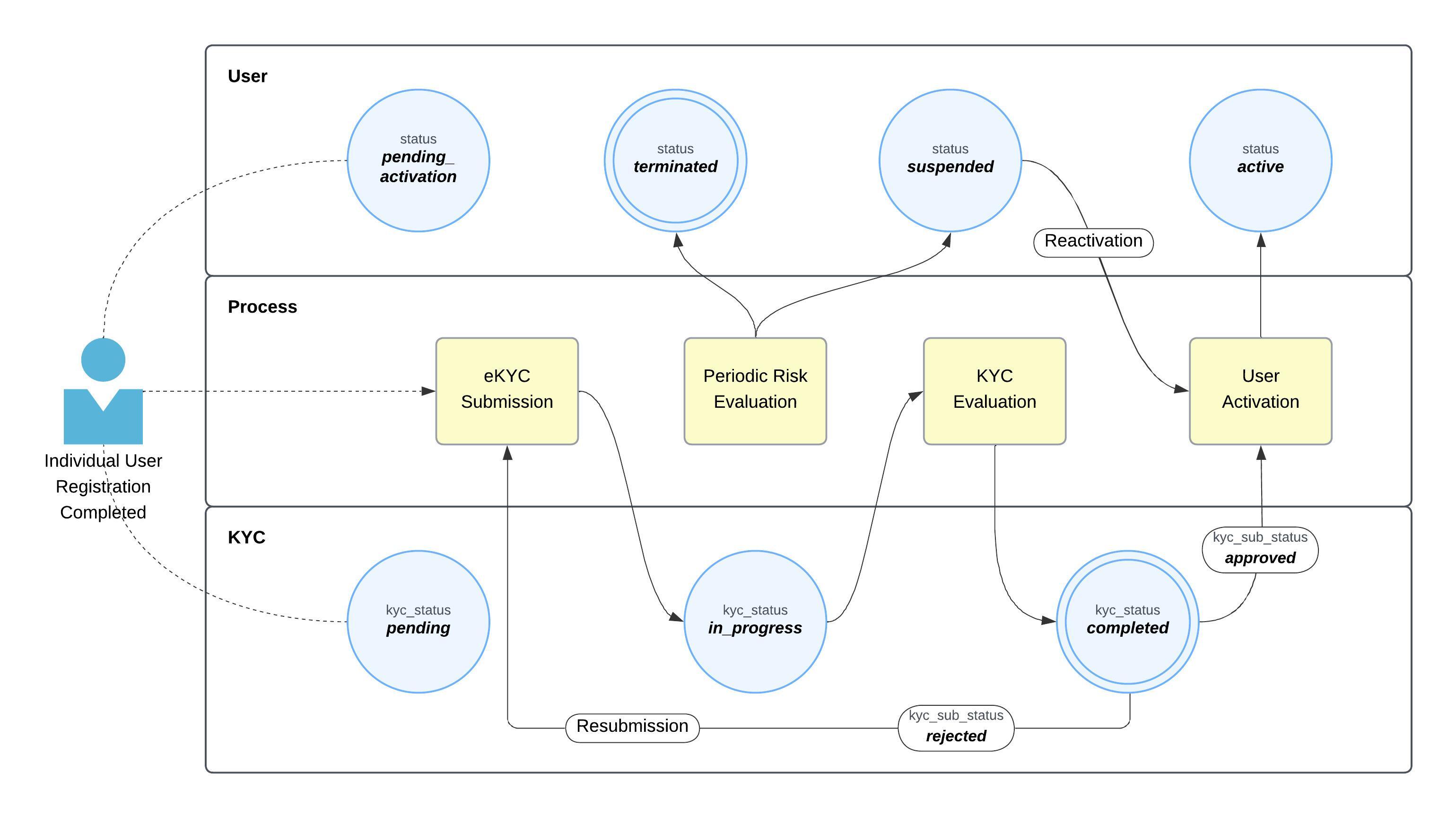
Individual eKYC Workflow
- Profile Completion: Once the user completes their profile, their
user.statusupdates topending_activationand theiruser.kyc_statusupdates topending. To activate the account, the user must now undergo eKYC. - KYC Submission: Upon eKYC submission, the
user.kyc_statustransitions toin_progress. This automatically triggers the KYC evaluation process. - Evaluation Completion: Once the evaluation concludes, the
user.kyc_statusupdates tocompleted. - Evaluation Results: Based on the review, the
user.kyc_sub_statuswill be marked as eitherapprovedorrejected.- If Rejected: Prompt the user to correct the specified rejection reasons and resubmit their eKYC application.
- If Approved: This triggers the platform-initiated User Activation process. The user is now granted access to the platform's financial assets and capabilities.
- Ongoing Monitoring: A periodic risk evaluation occurs throughout the lifetime of the user's account. Based on these evaluations, the
user.statuscan be updated tosuspended(a reversible action) orterminated(an irreversible action). - Account Reactivation: If an account is suspended, the partner can initiate a reactivation process once the underlying suspension reason has been fully resolved.
KYC and Individual User State Transition Updates
Because KYC evaluation is an asynchronous process, all status updates are delivered securely via the USER.STATUS (Individual) and ASSOCIATED_PARTIES.PROFILE.STATUS (Individual - Associated Parties) webhooks. Each webhook payload provides the real-time user and KYC states to keep your system in sync. You must monitor these incoming updates and trigger the appropriate next steps or follow-up actions based on the specific states returned.
Verification State Transitions
Please note that the state progression of a KYC application depends on the chosen verification method:
- Document-Based Verification: The application may transition through states 1 to 21, depending on your specific onboarding requirements and the user's calculated risk profile.
- Authentication-Based Verification: The application may skip states 1 through 8. Because physical documents are not required for this method, data and profile verification are collected directly from a trusted third-party verification system. The third-party system then hands the data back to our system to conduct the final risk profiling.
|
|
|
| [I] Complete the profile questionnaire. |
|
|
|
| No action required. |
|
|
|
| [I] Upload POI requirement. |
|
|
|
| No action required. |
|
|
|
| [I] Upload POA requirement. |
|
|
|
| No action required. |
|
|
|
| [I] Undergo liveliness detection. |
|
|
|
| No action required. |
|
|
|
| No action required. |
|
|
|
| [I] EDD activated — complete the EDD questionnaire. |
|
|
|
| No action required. |
|
|
|
| [I] EDD activated — complete the PEP questionnaire. |
|
|
|
| No action required. |
|
|
|
| [I] EDD activated — complete the sanction questionnaire. |
|
|
|
| No action required. |
|
|
|
| [I] EDD activated — complete the AML questionnaire. |
|
|
|
| No action required. |
|
|
|
| Waiting for manual MatchMove Compliance approval. |
|
|
|
| The user has been activated. [P] Proceed with financial asset provisioning for the user. |
|
|
|
| The KYC submission has been rejected due to invalid documents. [I] If the user is still inside the KYC capture screen, the user can resolve the rejection by uploading a valid document. [P] No action required, because the KYC capture screen is still open, and the user still has an option to resolve it. |
|
|
|
| The KYC document submitted by the user has been rejected. [I] If the user decides to terminate the KYC capture session (in scenario 20), he can return back to the KYC capture screen by requesting a new link from the partner app. Once back to the KYC capture screen, he can resolve the pending document requirements by uploading valid documents. [P] Allow users to request a new KYC capture link to allow them to resume his session and resolve the pending document requirements. |
|
|
|
| The user has been terminated as a result of KYC and risk evaluation. [P] Notify the user regarding the termination. |
KYC Rejection Reasons - Individuals
This section provides an exhaustive list of all the individual KYC rejection reasons and their corresponding descriptions that are available on the platform.
ADDRESS_MISMATCH | Address does not match the proof of address. |
|---|---|
AGE_BELOW_MINIMUM | User is below the minimum age allowed. |
AGE_EXCEEDS_MAX_LIMIT | User is above the maximum age allowed. |
BLACKLISTED_PROFILE_INFO | Profile details match a blacklist or sanctions entry. |
COUNTRY_MISMATCH | Country on the document does not match the country declared. |
DOB_MISMATCH | Date of birth does not match the document. |
DOCUMENT_AUTHENTICITY | The document shows signs of tampering or forgery. |
DOCUMENT_DEMOGRAPHIC_MATCH | Demographic details on the document do not match the profile. |
DOCUMENT_EXPIRED | The document is past its validity date. |
DOCUMENT_EXPIRING_SOON | The document expires within the minimum validity period required. |
DOCUMENT_ID_REJECTED | The identity document submitted was not accepted. |
DOCUMENT_IMAGE_QUALITY_ISSUE | The document image is unreadable. |
DOCUMENT_ISSUING_COUNTRY_NOT_SUPPORTED | The issuing country of the document is not supported. |
DOCUMENT_LANGUAGE_NOT_SUPPORTED | The document language is not supported. |
DOCUMENT_MISSING | A required document was not submitted. |
DOCUMENT_NOT_RECENT_ENOUGH | The document is older than the maximum age allowed. |
DOCUMENT_POA_REJECTED | The proof of address submitted was rejected. |
DOCUMENT_QUALITY | Document quality is too poor to process. |
DOCUMENT_SELFIE_REJECTED | The selfie is unusable or does not match the document photo. |
DOCUMENT_SIGNATURE_REJECTED | The signature on the document was rejected. |
DOCUMENT_TYPE_MISMATCH | Document type submitted differs from the type required. |
DOCUMENT_VIDEO_REJECTED | The verification video submitted was rejected. |
DUPLICATE_DETAILS | The details submitted match an existing profile. |
EXPIRED_DOCUMENTS | One or more of the documents submitted have expired. |
GENDER_MISMATCH | Gender does not match the document. |
INFORMATION_INCOMPLETE | Mandatory information is missing or incomplete. |
INFORMATION_MISMATCH | Application information does not match the verification source. |
INVALID_PROFILE_INFO | Profile information is invalid or in an unaccepted format. |
LIVELINESS_AUTHENTICATION | The liveness check could not be completed successfully. |
LIVENESS_VERIFICATION_FAILED | The user did not pass the liveness check. |
MISMATCH_PROFILE_DETAILS | Profile details do not match the document. |
MISMATCH_PROFILE_NAME | Profile name does not match the name on the document. |
NAME_MISMATCH | Name on the document does not match the application. |
OTHERS | Non-standard rejection. Contact compliance for further instruction. |
REGION_NOT_SUPPORTED | The user's region is not serviceable under this program. |
REJECTED | Know Your Customer (KYC) not approved. |
REJECTION_REQUESTED | The applicant asked to withdraw the application. |
SUSPECT_PROFILE | The profile is flagged for fraud or risk indicators. |
UNSUPPORTED_DOCUMENTS | The document type is not accepted for this program. |
Related Links
On this page
- Individual eKYC