Launching a card program
Learn the end-to-end operational process for launching your card program, including mandatory network approvals, compliance submissions, and physical or virtual card design. This guide covers all the non-technical prerequisites you need to complete before your program goes live.
Audience: MatchMove Partners launching a card program on the MatchMove Banking Operating System.
Scope: The non-technical and operational program activities required to start a card program — BIN (Bank Identification Number) certification and assignment, PPM (Prepaid Program Management) submission and approval, the DFCP (Digital First Card Program) form, and card design and approval. These activities are outside the technical integration with the MatchMove Banking API (Application Programming Interface) and the banking platform.
Technical implementation (API integration, UAT (User Acceptance Testing), and go-live) is not covered here — it is a separate track that runs in parallel with the timeline in this document and is documented in Start your implementation on the developer portal.
Regional availability: Product capabilities, BIN types, funding models, and process details described in this document vary by region, Financial Institution, and Payment Network. Not all features are available in all markets. Your MatchMove Program Manager will confirm what applies to your program and region during project kick-off.
Document validity: Published August 14, 2026 The processes, requirements, and timelines described in this document are true as of this writing and are subject to change by the Payment Networks and Financial Institutions without prior notice. Regional nuances apply throughout the workflow — the exact sequence, forms, review durations, and approval requirements can differ by market. Always confirm the current process with your MatchMove Account and Implementation Manager before relying on this document for planning.
1. Overview
Launching a card program involves four parties working in sequence and in parallel:
Partner | The Extension Partner — the program owner. Defines the proposition, provides brand assets and program details, completes forms, and builds the customer-facing experience. |
MatchMove | Program manager and platform provider. Coordinates all submissions, performs first-line review, manages the Financial Institution and Payment Network relationships, and configures the platform. |
Financial Institution (FI) | The regulated issuer / BIN sponsor. Reviews and endorses all program submissions, owns the relationship with the Payment Network, and holds final accountability to the regulator. |
Payment Network | The card scheme (e.g. Mastercard, Visa). Approves the card design, the program proposal (PPM — prepaid programs), the digital-first experience (DFCP — numberless card designs), and assigns/certifies the BIN. |
Indicative end-to-end timeline: typically 8–15 weeks for the default configuration (shared prepaid BIN), ranging from ~4–8 weeks for the fastest configuration (shared debit BIN, full-detail card) to ~15–24 weeks for a dedicated prepaid BIN. Physical card availability adds a further 10–14 weeks of card production after design approval — see the end-to-end tally by program configuration in Section 9. Several tracks run in parallel, and the technical implementation track runs in parallel with all of the activities in this document.
Process at a Glance
The launch runs through the Prerequisites plus six steps. Steps 1, 2, and 3 — and the Step 4 artwork drafting — run in parallel from kick-off; the Step 4 submission is the convergence point where the BIN and the applicable PPM/DFCP approvals must be in place. Steps 5 and 6 then follow sequentially.
- Prerequisites — Agreement and Due Diligence (2–3 weeks): Commercial agreement signed; KYB completed; program definition and eligibility confirmed.
- Step 1 — Dedicated BIN Setup (7–9 weeks; dedicated BINs only): BIN assigned, certified, and enabled with the Payment Network. Skipped entirely on the default shared-BIN model.
- Step 2 — PPM Submission and Approval (4–7 weeks; prepaid BINs only): The program is registered with the Payment Network through the Financial Institution.
- Step 3 — DFCP Form (2–4 weeks; numberless card designs only): The digital-first cardholder experience is documented and approved by the network.
- Step 4 — Card Design Submission (usually 1–3 weeks): Partner artwork is reviewed, endorsed, costed, and submitted to the network.
- Step 5 — Card Design Approval (1–2 weeks): The Payment Network reviews and approves the design; proofing follows for physical cards.
- Step 6 — Mass Blank Card Production (10–14 weeks; physical cards only): Printing, then kitting, of the physical cards — starts only after the design approval.
2. Prerequisites (Before Any Submission)
⏱️ Estimated time: 2–3 weeks — driven largely by how quickly complete Know Your Business (KYB) documentation is provided.
These must be in place before the formal launch process begins.
Requirements
- Signed commercial agreement between the Partner and MatchMove. MatchMove will request the Partner to have an entity in the jurisdiction designated for the partnership — however, this does not need to hold up signing: the agreement can be signed on the Partner's existing entity and novated (transferred) to the designated entity after it is established (see FAQ 6).
- Completed Partner due diligence (KYB), including corporate documents, ownership structure with Ultimate Beneficial Owners (UBOs), and licensing information where applicable.
- Agreed program definition: card type (prepaid / debit), form factor (virtual, physical, or both), target market and geography, funding sources, and use cases.
- Named Partner contacts: program owner, compliance contact, technical lead, and design/brand contact.
- Program eligibility confirmed against platform restrictions — see the developer portal's Prohibited industries, High-risk industries, Prohibited countries, and High-risk countries pages before committing to a launch plan.
Actions by Stakeholder
Partner | Provide KYB documents, confirm program definition, and nominate contacts. |
MatchMove | Complete Customer Due Diligence (CDD) review; confirm program feasibility with the Financial Institution; issue the launch checklist and kick-off plan. |
Financial Institution | Preliminary review of the Partner and proposed program. |
Payment Network | Not yet involved. |
- Approvers: MatchMove Compliance and the Financial Institution (Partner onboarding approval).
- Environment: Not environment-bound — a documentation and due-diligence activity.
3. Step 1 — BIN Selection and Setup (for dedicated BINs)
⏱️ Estimated time: 7–9 weeks end to end — assignment ~1 week, network project setup ~1 week, certification 4–5 weeks (the long pole), and test/go-live 1–2 weeks. Skipped entirely on the default shared-BIN model.
The BIN (Bank Identification Number) identifies the issuer and product on the network. Programs run on one of two BIN models:
Shared BIN (the default) | A standard BIN already certified and live on the MatchMove platform, shared across multiple programs. The network recognizes only the parent BIN — allocating a range or sub-range within it to an individual program is an internal activity of the Financial Institution / MatchMove, not a network approval. MatchMove allocates a range on the shared BIN and configures the program against it (products, limits, currencies) as part of standard platform setup; for prepaid programs, the PPM references the existing shared BIN. | This entire step does not apply — no Payment Network certification or network-level BIN assignment is needed. |
Dedicated BIN (on Partner request) | A new BIN assigned exclusively to the Partner's program, requested through the Financial Institution (BIN sponsor) and assigned by the Payment Network. Typically chosen for brand ownership of the BIN, portfolio portability, or a product type or country of issuance not supported on the shared BINs. | The full process in this step applies — assignment, network implementation project, certification, and test/go-live, adding approximately 7–9 weeks to the launch plan. |
BIN Types — and When This Step Applies
Every BIN (and each account range within it) carries a fixed set of registered attributes. These concepts apply across payment networks, with only the terminology differing:
Funding type | Prepaid or debit |
Use designation | Consumer or commercial. |
Brand program code | The specific network product the range issues under. Within the commercial designation, program codes further distinguish tiers such as Business (small-business cards), Corporate, Purchasing, and Fleet — so a "business BIN" is a commercial BIN carrying a business-tier program code, in whichever funding type the market supports (most commonly commercial prepaid on this platform). |
Licensed country of issuance | The country the BIN is licensed to issue in. |
Settlement currency | The currency the range settles in. |
The combination of funding type and use designation gives the four primary BIN types supported in MatchMove:
Consumer prepaid | Issued to individuals, spending a preloaded balance held on the platform. The standard type for consumer wallet and card programs. |
Commercial prepaid | Issued to businesses and their employees or payees, funded from a preloaded corporate float. Covers expense management, payroll, and disbursement programs; cards registered under the Business product tier carry "Business" printed on the card face. |
Consumer debit | Issued to individuals, drawing directly on a deposit account the cardholder holds with the Financial Institution. |
Commercial debit | Issued to businesses, drawing on a business deposit account; Business-tier cards in this designation likewise carry "Business" on the card face. |
In every case, the card face must reflect the product the range is registered for — which is why "Business" (or any commercial marking) cannot appear on a card issued from a consumer range.
A range can only ever issue the product it is registered for. This is why a program cannot simply "reuse" any available BIN: a debit product cannot be issued on a prepaid range, a commercial product cannot ride a consumer range, and a range licensed for one country cannot issue in another.
Who can request a BIN. The Payment Network assigns BINs only to its licensed customers — principal members/issuers (each network identifies its licensed members by a membership identifier) or affiliates acting through their sponsoring principal. Program managers and partners can never request a BIN from the network directly. The request chain is always: Partner → MatchMove → Financial Institution (the licensed customer / BIN sponsor) → Payment Network. The Financial Institution's license must also cover the requested product and country — a license to issue consumer prepaid in one market does not automatically extend to debit, commercial products, or other countries.
When the full dedicated-BIN process is required, reduced, or skipped:
Program matches an existing certified shared BIN — same funding type, use designation, product, and country | Internal range allocation on the shared BIN by MatchMove / Financial Institution; platform configuration only | Skipped entirely (the default path) |
New product variation within a family already certified on an existing BIN — e.g. a new design that requires a new program code or market segment where the network's regional rules allow segmentation by account range | New 11-digit account range (or 8-digit sub-BIN) added under the existing BIN via a network implementation project; certification burden is reduced because the parent BIN's processing is already certified | Reduced — project and configuration, lighter testing |
New funding type (e.g., first debit program when existing BINs are prepaid), new use designation (first commercial program), or new country of issuance | New BIN assignment and full certification — the processing chain has never been certified for this product configuration | Full 7–9 week process |
Partner elects a dedicated BIN for a product type already supported | New BIN assignment and full certification, by choice rather than necessity | Full 7–9 week process |
Why partners choose a dedicated BIN when they don't strictly need one:
Scale | A single 8-digit BIN accommodates roughly a million card numbers, so very large programs need their own range. |
Isolation | On a shared BIN, elevated fraud from another program on the same BIN can cause merchants to treat the whole BIN with suspicion. |
Sole Ownership | Dedicated 8-digit BINs streamline marketing communications and make it easier to plan events and activities with merchants, as the entire BIN is exclusive to your program rather than shared with others. |
Portability | A dedicated BIN is perceived as easier to move when changing sponsor banks, though in practice moving banks involves friction regardless, particularly for physical cards printed with the issuer's name. |
A note on debit specifically: debit cards draw on a deposit account held by the cardholder, so debit issuance carries prerequisites that prepaid does not — the Financial Institution must be able to hold cardholder deposit accounts in the market, and in most jurisdictions only deposit-taking institutions can issue debit. A partner asking to "move from prepaid to debit" is therefore not just requesting a different BIN type: it changes the account structure, the regulatory basis, and potentially which Financial Institution can support the program. The network-side process is the same 7–9 weeks described below, but Financial Institution readiness should be scoped before the BIN request is made.
Dedicated BIN Setup: Assignment, Certification, and Go-Live
For dedicated-BIN programs, the process runs in four stages, in this order:
1 | BIN request and network assignment — MatchMove formally requests the new BIN from the Financial Institution (BIN sponsor); the Financial Institution requests the BIN assignment from the Payment Network. The network assigns the BIN and registers the product parameters. | ~1 week |
2 | Network implementation project setup — MatchMove requests the network's implementation project, and a network project manager is assigned to run the certification. | ~1 week |
3 | BIN certification — certification test scripts are executed with the network, proving the BIN and the processing chain behind it correctly handle authorization, clearing, settlement, and exception flows. Runs on the network certification environment, connected to MatchMove staging. | 4–5 weeks |
4 | BIN test and go-live + PPM submission — final production testing and enablement of the certified BIN on the live environment; the PPM (Step 2, prepaid BINs) is submitted in the same window. | 1–2 weeks (2 if clarifications arise) |
Network Implementation Overview
A newly assigned BIN cannot process transactions until MatchMove opens a formal implementation project to configure it within the payment network's systems. It takes approximately one week for the network to process this request and assign a dedicated Project Manager to oversee the technical setup. Partners do not need to interact with this Project Manager directly, as the MatchMove Card Operations team will manage all testing and communication on your behalf. Please note that the network may charge a project-creation fee depending on the region and program type. Finally, because the PPM (required for prepaid programs) must reference an active BIN, dedicated prepaid BINs must complete this network assignment and certification before the PPM is submitted. In contrast, prepaid programs using the default shared BINs have already satisfied this certification and can submit their PPM immediately. Dedicated debit BINs follow the same four stages, with no PPM at the end.
3.1 Requirements and Parameters
BIN assignment | A new BIN is assigned by the Payment Network to the Financial Institution (BIN sponsor) at the start of the process, on MatchMove's formal request. |
Product configuration | Program code, funding type (prepaid/debit), consumer/commercial designation, and country of issuance registered against the BIN. |
Network implementation project | Implementation project opened with the Payment Network and a network project manager assigned before certification can begin — the formal work order for all network-side configuration and testing. |
Network certification | Mandatory certification test scripts executed with the network covering authorization, clearing, and settlement message flows for the BIN. Performed on the network certification environment, connected to MatchMove staging. |
EMV/contactless certification (physical) | EMV (the Europay–Mastercard–Visa chip standard) profile and contactless kernel certification via the personalization bureau for physical card programs. |
Tokenization enrollment (if in scope) | BIN enrollment for network tokenization services to support wallet provisioning (e.g. Apple Pay / Google Pay), where included in the program. |
Processor setup | BIN range configured on the issuer processor and MatchMove platform: authorization rules, currency, limits, and routing — staging configuration for certification and live configuration at the test-and-go-live stage. |
3.2 Process
- MatchMove formally requests the new BIN from the Financial Institution (BIN sponsor).
- The Financial Institution requests the BIN assignment from the Payment Network; the network assigns the BIN and registers the product parameters. (~1 week)
- MatchMove requests the network implementation project; the network assigns a project manager who owns the enablement end to end — network-side configuration, test scripts, testing schedule, defect tracking, and completion sign-off. (~1 week)
- MatchMove configures the BIN on the staging platform and issuer processor test setup.
- Certification test scripts are executed against the network's certification environment — authorization, clearing, settlement, and exception flows — with defects resolved and retested. For physical programs, EMV and contactless profiles are certified with the personalization bureau. (4–5 weeks)
- The Payment Network signs off on certification; final BIN testing and production enablement follow in the live environment, and the PPM (prepaid BINs) is submitted in the same window. (1–2 weeks)
3.3 Stakeholder Actions and Approvers
Partner | No direct action; kept informed of milestones. Confirms product parameters (limits, currencies) where choices exist. |
MatchMove | Formally request the BIN and the network implementation project; staging and live configuration of the BIN; execute certification test cycles; and manage defect resolution. |
Financial Institution | Request the BIN assignment from the network; own the BIN relationship; approve production enablement. |
Payment Network | Assign the BIN and register product parameters; assign the implementation project manager; run and sign off certification. |
- Approvers: Payment Network (BIN assignment and certification sign-off); Financial Institution (production enablement).
- Environment: Stages 1–2 — administrative (no environment). Stage 3 (certification) — network certification environment with MatchMove staging. Stage 4 (test and go-live) — live (production).
4. Step 2 — PPM Submission and Approval
⏱️ Estimated time: 4–7 weeks — Financial Institution review typically 2–3 weeks, network review 2–4 weeks. Incomplete volume forecasts and Know Your Customer (KYC) model ambiguity are the most common causes of delay.
The Prepaid Program Management (PPM) is the formal program proposal registered with the Payment Network through the Financial Institution. It describes what the program is, who it serves, and how it is controlled. The network's approval of the Prepaid Program Management is what authorizes the program to operate under the scheme.
When is a PPM required? The requirement follows the funding type of the BIN the program runs on:
BIN Funding TypePPM Requirement
Prepaid (consumer or commercial)
PPM required — the program must be registered and approved through the PPM before it can operate under the scheme.
Debit (consumer or commercial)
PPM not required — debit programs are not registered through a PPM; program approval is handled by the Financial Institution under its debit product approvals.
Do all prepaid programs require a new PPM? Every prepaid card program must be registered with the Payment Network before launch (debit programs are exempt — see the table above). But not every prepaid program requires a new, full PPM submission. What is required depends on how the program is structured:
4.1 Requirements and Parameters
Below is the information needed to be prepared before the PPM submission:
Program description | Product type (e.g. reloadable prepaid, debit), positioning, and intended use cases. |
Target market | Customer segments (consumer / corporate), geography, and distribution channels. |
Funding and load | Permitted funding sources (bank transfer, card top-up, payroll, and corporate float), load limits, and balance limits. |
Program limits | Transaction limits, velocity limits, ATM (Automated Teller Machine) access (if any), and cross-border usage parameters. |
KYC model | Tiered KYC structure, verification methods, and limits per tier, aligned to the Financial Institution's regulatory obligations. |
AML/CFT controls | Anti-Money Laundering / Countering the Financing of Terrorism (AML/CFT) — transaction monitoring approach, sanctions screening, and suspicious-activity escalation model. |
Projected volumes | Forecast card issuance, active cards, load volume, and spend volume (typically a 3-year projection). |
Program roles | Identification of the Program Manager (MatchMove), the Partner, and any other service providers, as required by network rules. |
Information gathered in the PPM form. The form itself consolidates the above into a structured submission. Typical fields include:
Program identification | Program name, launch date, program category (e.g. consumer prepaid, corporate prepaid, debit), and the Financial Institution's network membership identifiers. |
Parties and roles | Issuer (Financial Institution), Program Manager (MatchMove), the Partner, and any other registered service providers (processor, personalization bureau, and distribution agents). |
BIN and product details | The BIN/range the program will operate on, the network program code/platform, the card brand and tier, and the form factor (virtual, physical, or both). |
Target market | Country of issuance, customer segments (consumer/corporate), eligibility criteria, and distribution channels (app, web, agent, employer). |
Funding and limits | Permitted load/funding sources, maximum balance, load limits (per transaction/day/month), spend and withdrawal limits, ATM access, and domestic vs. cross-border usage. |
KYC and compliance | KYC tiers with verification methods and limits per tier, AML/CFT monitoring approach, and sanctions screening. |
Cardholder fees | The fee schedule is presented to cardholders (issuance, reload, ATM, foreign exchange (FX), dormancy), where required by the network or regulator. |
Volume forecasts | Projected cards issued, active cards, load volume, and spend volume, typically over 3 years. |
Marketing and distribution description | How the program will be promoted and how cards reach cardholders. |
Dependency note — dedicated BINs come first: The PPM must reference the issuing BIN and its registered product configuration. Programs on the default shared BINs are unaffected — the shared BIN is already certified, and the PPM references it directly. For a dedicated prepaid BIN, the BIN assignment and certification (Step 1) must complete first; the PPM is then submitted at the BIN test-and-go-live stage. See Section 3 for the full sequence.
4.2 Process
- The MatchMove Implementation team provides the PPM form and information pack to the Partner when needed, pre-filled with platform-level parameters.
- The Partner fills out the PPM form — completing the business sections: program description, target market, volumes, and distribution.
- MatchMove reviews for completeness and consistency and aligns the compliance sections with the Financial Institution.
- The Financial Institution performs a risk and compliance review, then submits the PPM to the Payment Network.
- The Payment Network reviews and may raise clarification queries, which MatchMove coordinates responses to.
- Network approval is issued; the program is registered under the Financial Institution's license.
4.3 Stakeholder Actions and Approvers
Stakeholder | Action |
|---|---|
Partner | Fill out the PPM form (business sections); provide volume forecasts; respond promptly to clarification queries. |
MatchMove | Assemble and quality-check the submission; coordinate all query responses; track approval status. |
Financial Institution | Risk/compliance review; formal submission to the network; regulatory sign-off. |
Payment Network | Program review and approval; program registration. |
- Approvers: Financial Institution (risk/compliance) and Payment Network (final program approval).
- Environment: Not environment-bound — a documentation and registration activity (no staging or live configuration involved).
5. Step 3 — DFCP Form (Digital First Card Program)
⏱️ Estimated time: 2–4 weeks, assuming the cardholder app journey is build-complete at submission. Can run in parallel with Steps 1–2. Where the design omits or masks card details, DFCP approval is required before the card design submission (Step 4).
Where the Partner opts for a numberless card — a design that omits or masks the card details — PAN (Primary Account Number), expiry, and CVV (Card Verification Value) — on the card face, with credentials delivered and accessed digitally instead — the Payment Network requires a Digital First Card Program (DFCP) submission. This certifies that the digital cardholder experience meets the network's standards for security, disclosure, and servicing.
When is a DFCP required? The requirement follows the Partner's card design decision:
Card Design DecisionDFCP Requirement
Numberless card — the design omits or masks the PAN, expiry, or CVV on the card face; the cardholder accesses full details digitally
DFCP required — must be submitted and approved before the card design can be submitted (see the Step 4 prerequisites).
Full-detail card — the design carries the complete card details on the card face
DFCP not needed.
What does "digital-first" mean?
A digital-first card program is one where the card is born digital: the cardholder applies, is approved, and receives a usable card entirely through digital channels — with a physical card as an optional companion rather than the primary product. The Payment Network's digital-first framework sets functional requirements across four areas of the cardholder journey:
1 | Digital acquisition | The cardholder applies online or in-app and receives their card details almost immediately upon approval, with no paper application or branch visit. |
2 | Instant digital issuance and usage | Card credentials are available for use right away: online, in-app, and at the point of sale through wallet provisioning (e.g. Apple Pay / Google Pay). A physical card is optional and, where offered, may omit printed credentials. |
3 | Secure access to card details | The full PAN, expiry, CVC (Card Verification Code, also written CVV), and customer-service information are accessed through the digital environment (with masking and step-up authentication), removing the need for them to appear on a physical card. |
4 | Digital card management and servicing | The cardholder can check balances, view transactions, receive alerts, manage card controls, and reach support entirely within the digital channel. |
The DFCP form is how the network verifies that a program meets these requirements before launch. Because many programs on the MatchMove platform opt for numberless designs with credentials delivered through the partner app, the DFCP applies to many partner launches — and since the evidence is specific to each partner's app and journey, it cannot be inherited from another program the way an existing PPM or shared BIN can.
5.1 Requirements and Parameters
Digital card display | Screens showing how the approved card art, PAN, expiry, and CVV are displayed in-app, including masking behavior and step-up authentication before revealing full credentials. |
Physical Card Art | Final physical card artwork for review, with the PAN and other sensitive card details partially or fully omitted from the physical design. |
DFCP Form | Partners are required to prepare a comprehensive workflow detailing: how digital cards are instantly generated for online spending prior to physical card delivery and any additional processes specified in the required form. Note: The Financial Institution will review the workflow prior to Payment Network approval. The MatchMove Implementation team will supply the form and a sample for guidance when needed. |
Credential delivery | How the cardholder receives and accesses card credentials digitally (no physical carrier) and controls preventing unauthorized exposure. |
Cardholder servicing | Digital access to transaction history, card controls (freeze/unfreeze), PIN (Personal Identification Number) management (if applicable), and lost/stolen reporting. |
Terms and disclosures | In-app access to cardholder terms and conditions, fees, and customer support channels. |
Security controls | Authentication model for app access and sensitive actions, aligned to network requirements. |
Supporting evidence | Annotated screenshots or a demo build of the cardholder journey, mapped to each DFCP requirement. |
Information gathered in the DFCP form. The form documents the digital-first experience against the network's checklist. Typical fields include the following:
Program identification | Program name, issuer (Financial Institution), BIN/product reference, and target launch date, linking the DFCP to the PPM and card design. |
Digital-first features in scope | Which capabilities the program uses: virtual card issuance, digital display of PAN/expiry/CVV, digital PIN set/reset, tokenization, and wallet provisioning (e.g. Apple Pay / Google Pay), and optional physical card issuance on request. |
Application details | The cardholder-facing app or web channel, supported platforms (iOS/Android/web), and where the digital card experience sits within it. |
Credential display and security | How full card credentials are revealed (masking defaults, step-up authentication method, session/timeout behavior) and the authentication model for app access and sensitive actions. |
Cardholder servicing evidence | Screens demonstrating transaction history, card controls (freeze/unfreeze), lost/stolen reporting, and customer support access. |
Disclosures | Where cardholders access terms and conditions and the fee schedule within the digital journey. |
Evidence pack | Annotated screenshots or a demo build, mapped requirement-by-requirement to the network's DFCP checklist. |
5.2 Process
- The MatchMove Implementation team provides the Partner with the DFCP form and requirements checklist when needed, mapped to platform capabilities (many requirements are satisfied by the MatchMove platform by default).
- The Partner fills out the DFCP form and supplies the app screens / journey evidence for the Partner-built experience layers.
- MatchMove reviews the completed form and evidence pack against the checklist and quality checks the submission.
- The Financial Institution endorses and submits the DFCP to the Payment Network.
- The Payment Network reviews, raises comments if any, and issues DFCP approval.
5.3 Stakeholder Actions and Approvers
Partner | Fill out the DFCP form; provide app journey evidence; implement any required UX (user experience) changes from network feedback. |
MatchMove | Map requirements to platform capabilities; assemble and quality-check the submission; coordinate remediation. |
Financial Institution | Endorse and submit the DFCP. |
Payment Network | Review and approve the digital-first experience. |
- Approvers: Payment Network (final); Financial Institution (endorsement).
- Environment: Evidence is captured from the staging build of the cardholder app/journey (a build-complete staging or UAT environment is sufficient — production is not required for submission).
Digital wallet enablement (e.g. Apple Pay / Google Pay): enabling the program's cards in digital wallets is handled as part of the technical implementation track, not the approvals in this document. Scope it at kick-off — wallet-provider approval timelines vary by market and can trail the card go-live without gating it. See Start your implementation on the developer portal.
6. Step 4 — Card Design Submission
⏱️ Estimated time: usually 1–3 weeks — artwork drafting and MatchMove review cycles through Financial Institution endorsement, commercials, and submission to the Payment Network. Note that this timeline ultimately depends on how quickly the Partner can finalize and approve the design on their side, as the card design will need to align with and follow the Partner's own internal branding guidelines. Designs that follow the template closely on first submission move fastest. Refer to the Card Design Submission section to learn more.
Card design is required for every program. There is no default or pre-approved white-label card art on the platform — every program launches with its own card design, and every card face — physical and virtual — must be approved by the Payment Network before it can be issued or displayed to cardholders. This step covers everything up to and including the submission of the design to the network; the network's review, approval, and production follow in Step 5.
6.1 Requirements and Parameters
Artwork files | Print-ready vector files (Adobe Illustrator AI or Encapsulated PostScript EPS format) plus PDF proofs, front and back, at the network-specified dimensions and bleed. Virtual card art supplied as high-resolution digital renders. |
Network brand mark | The scheme logo is placed per the network's brand standards — position, size, clear space, and approved color variants. |
Issuer identification | The Financial Institution (issuer) name displayed as mandated by the network and regulator. |
Mandatory elements (physical) | Chip position, contactless indicator, hologram/brand hologram element, signature panel or "no signature required" treatment, magnetic stripe (if applicable), and card number/expiry/CVV placement per the personalization spec. |
Mandatory elements (virtual) | Card art rendering with scheme mark, masked/unmasked PAN display rules, and expiry/CVV presentation consistent with the approved design. |
Prohibited content | No third-party trademarks without authorization, no content conflicting with network brand standards, no misleading product descriptors. |
Co-brand rules | If the Partner brand appears on the card, co-brand placement rules apply (relative sizing and positioning against the scheme mark). |
6.2 Prerequisites
BIN Assignment | A BIN must already be assigned. This establishes the card type and ensures all necessary network elements are incorporated into the design upfront. |
Design Freeze | The final design must be locked in. Any subsequent changes will reset the project timeline from the beginning. |
PPM Approval | Prepaid BINs require the program to be registered and approved through the PPM before the design can be submitted for review; this does not apply to debit BINs. See Step 2 for more information. |
DFCP Approval | If the Partner opts for a numberless card — a design that only displays a partial or masked PAN or incomplete card details — a DFCP approval from the network must be submitted and approved before the actual card art design can be submitted for approval. See Step 3 for more information. |
Sampling Decision | The Partner must decide whether to request a physical card sample/prototype (a dummy for aesthetic proofing) or proceed directly to mass production. |
6.3 Submission Process
- Draft Submission: The Partner submits the draft artwork to MatchMove using the design template and specifications provided during kick-off.
- MatchMove Review: MatchMove reviews the artwork against network brand standards and the personalization bureau's technical specifications, returning consolidated feedback if adjustments are needed.
- Design Freeze & Costing: Once the artwork is finalized and frozen, the final card cost is calculated based on the selected design features.
- Financial Institution Endorsement: MatchMove submits the clean, finalized design to the Financial Institution for endorsement.
- Commercials: A quotation is provided to the Partner for approval. An invoice is then issued and must be paid upfront before work commences on the next step.
- Network Submission:
- For Virtual Cards: The Financial Institution submits the design to the Payment Network's card design approval system.
- For Physical Cards: The printer submits the final pre-press form to the Payment Network.
6.4 Stakeholder Actions and Approvers
Partner | Produce final artwork in AI (Adobe Illustrator) file; respond to feedback; approve the quotation and settle the invoice. |
MatchMove | First-line design review; consolidate feedback; coordinate design freeze, costing, and commercials. |
Financial Institution | Endorse and approve the proposed design before submission to the network. |
Payment Network | Receives the submission (review and approval follow in Step 5). |
- Approvers: MatchMove (first-line review) and Financial Institution (endorsement) — the gates before the design reaches the network.
- Environment: Not environment-bound — an artwork and documentation activity.
7. Step 5 — Card Design Approval
⏱️ Estimated time: 1–2 weeks for network approval (SLA (Service Level Agreement): 5 business days per review round — each comment cycle is treated as a new request, resets the SLA, and typically adds 1–2 weeks of elapsed time). Physical programs add digital proofing, and an optional sampling run adds 4-5 weeks if requested.
Once the design is submitted (Step 4), the Payment Network reviews it against its brand standards and issues the approval that allows the card face to be issued or displayed to cardholders. For physical cards, approval flows straight into proofing and production.
7.1 Approval and Production Process
1. Proofing & Production (Physical Cards Only): The final freeze design is routed to the personalization bureau, and a digital proof of the final print layout is produced for Partner sign-off.
- If sampling is requested: This is a chargeable service that takes 4–5 weeks (excluding metal and LED cards) to produce a physical prototype for inspection.
- If sampling is not required: The design proceeds directly to mass production immediately after the Partner signs off and the Network approval on the digital prepress proof is obtained.
2. Network Approval: The Payment Network reviews the submission (SLA: 5 business days). If they return comments, the submission flow in Step 4 (steps 1–4) is repeated. Note: Each round of revisions is treated as a new request and resets the 5-day SLA clock.
7.2 Stakeholder Actions and Approvers
Partner | Respond to network comments (via Step 4 rework); sign off on the digital proof and physical samples (if requested). |
MatchMove | Coordinate comment cycles and resubmissions; liaise with the personalization bureau on proofing, sampling, and production. |
Financial Institution | Re-endorse revised designs where required. |
Payment Network | Final design approval. |
- Approvers: Payment Network (final).
- Environment: Not environment-bound — an artwork and documentation activity. The approved design is later configured for display in staging (for DFCP evidence and UAT) and live (at go-live).
8. Step 6 — Mass Blank Card Production (Physical Cards Only)
⏱️ Estimated time: 10–14 weeks — card printing 8–10 weeks, stationery printing 6-7 weeks (runs in parallel with card printing), then kitting 2–4 weeks, will all be a factor in the fulfillment process. Can only start after the card design approval (Step 5) is given.
Once the card design is approved, the physical cards move into actual production. This runs in two sequential stages:
Stage | Activity | Estimated Time |
|---|---|---|
1 | Card printing — mass production of the physical cards at the personalization bureau against the approved design. | 8–10 weeks |
2 | Stationery printing — production of the accompanying stationery (carriers, envelopes, and inserts). This depends on the quantity, type of personalization process, and stationery design. | 6–7 weeks. Runs in parallel with the card printing. |
3 | Kitting — assembling the printed cards and stationery into their final packs ready for distribution. | 2–4 weeks |
Card production is strictly sequential: It cannot begin until the Payment Network's design approval is issued, and kitting follows once both printing runs are complete. For digital-first programs, this does not gate the program launch — virtual card issuance can go live while production runs, with physical cards following. Programs whose primary product is the physical card should plan the launch date around this step.
8.1 Stakeholder Actions and Approvers
Partner | Confirm card quantities and distribution details; no other direct action. |
MatchMove | Liaise with the personalization bureau on production scheduling, quality, and delivery. |
Financial Institution | No direct action. |
Payment Network | No direct action, provided the design approval is in place. |
- Approvers: None — a production activity following the Step 5 approval.
- Environment: Not environment-bound — a physical manufacturing and fulfillment activity.
9. Consolidated Timeline
⏱️ End-to-end: configuration-dependent — typically 8–15 weeks to program approval readiness on the default shared prepaid BIN, from ~4–8 weeks (shared debit BIN, full-detail card) up to ~15–24 weeks (dedicated prepaid BIN). Physical card availability adds 10–14 weeks of card production (Step 6) after the design approval. Elapsed calendar time from signed agreement, with parallel tracks managed by MatchMove and the technical implementation track running alongside. See the tally by configuration below.
Indicative, assuming prompt turnarounds and no major rework:
Prerequisites (KYB, program definition) | 2–3 weeks | Pre-signing | Runs first — no parallelism. Gates everything else |
Step 1 — Dedicated BIN setup (dedicated BINs only) | 7–9 weeks | Post-signing | Can run in parallel with Steps 3–4 (artwork drafting) starting at kick-off. Does not apply to the default shared-BIN model. Four stages: BIN request & network assignment (~1 wk) → network project setup (~1 wk) → certification (4–5 wks) → BIN test & go-live (1–2 wks), with the PPM (prepaid BINs) submitted at the final stage |
Step 2 — PPM submission and approval | 4–7 weeks | Implementation | Can run in parallel with Steps 3–4 starting at kick-off on the shared-BIN model; for dedicated BINs, starts at the BIN test-and-go-live stage (see Step 1). Required for prepaid BINs only (see Section 4). Not required as a new submission for programs covered under an existing approved PPM (see Section 4) |
Step 3 — DFCP form | 2–4 weeks | Implementation | Can run in parallel with Steps 1–2 starting at kick-off (requires a build-complete app journey). Required only for numberless card designs (see Section 5); must be approved before Step 4 |
Step 4 — Card design submission | Usually 1–3 weeks — depends on how quickly the Partner finalizes and approves the design against their internal branding guidelines. | Implementation | Artwork drafting can run in parallel with Steps 1–3 starting at kick-off; the submission itself requires the BIN assigned and the applicable PPM/DFCP approvals (see Section 6.2) |
Step 5 — Card design approval | 1–2 weeks (+4–5 weeks if physical sampling is requested) | Implementation | Sequential — starts only after the Step 4 submission. 5-business-day network SLA per review round; each comment cycle resets the SLA; must complete before card production |
Step 6 — Mass blank card production (physical cards only) | 10–14 weeks (card printing 8–10 wks → stationery printing parallel 6-7 wks → kitting 2–4 wks) | Post-approval | Sequential — can only start after the Step 5 design approval. Digital-first programs can launch virtual issuance while production runs. |
End-to-end | Configuration-dependent — see the tally below | Typically 8–15 weeks on the default shared prepaid BIN model |
End-to-End Tally by Program Configuration
The end-to-end timeline depends on which steps the program's configuration triggers. All eight combinations:
Shared | Debit | Full-detail | Prerequisites + Design only (Steps 4–5) | ~4–8 weeks (the fastest configuration) | ~14–22 weeks |
Shared | Debit | Numberless | Prerequisites + DFCP + Design (Steps 3–5) | ~6–12 weeks | ~16–26 weeks |
Shared | Prepaid | Full-detail | Prerequisites + PPM + Design (Steps 2, 4–5) | ~8–15 weeks | ~18–29 weeks |
Shared | Prepaid | Numberless | Prerequisites + PPM + DFCP + Design (Steps 2–5; DFCP runs inside the PPM window) | ~8–15 weeks (the default configuration) | ~18–29 weeks |
Dedicated | Debit | Full-detail | Prerequisites + BIN + Design (Steps 1, 4–5) | ~11–17 weeks | ~21–31 weeks |
Dedicated | Debit | Numberless | Prerequisites + BIN + DFCP + Design (Steps 1, 3–5) | ~11–17 weeks | ~21–31 weeks |
Dedicated | Prepaid | Full-detail | Prerequisites + BIN + PPM + Design (Steps 1–2, 4–5) | ~15–24 weeks | ~25–38 weeks |
Dedicated | Prepaid | Numberless | Prerequisites + BIN + PPM + DFCP + Design (all steps; DFCP runs inside the BIN window) | ~15–24 weeks (the longest configuration) | ~25–38 weeks (the longest configuration) |
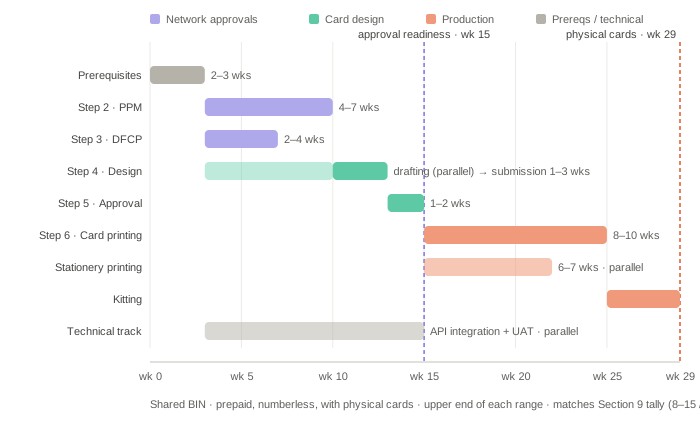
Card Program Launch Timeline — Shared BIN (Default Model)
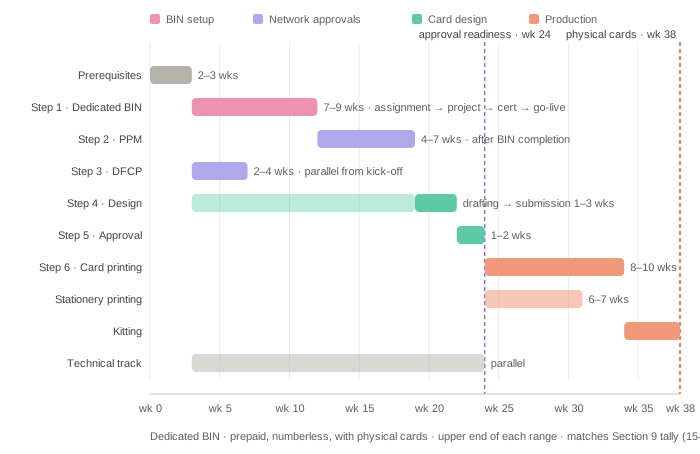
Card Program Launch Timeline — Dedicated BIN
How these tallies work:
- The weeks shown are calendar time from start to finish, not all the step durations added together. Steps that run at the same time are only counted once — for example, while the PPM is under review (4–7 weeks), the DFCP and the card artwork are being worked on in the background, so they add no extra weeks.
- What sets the pace is the longest chain of steps that must happen one after another. On the default shared-BIN model that chain is: Prerequisites → PPM review → design submission → design approval. On a dedicated BIN it is: Prerequisites → BIN setup → PPM review → design submission → design approval. Delays anywhere on that chain extend the end-to-end timeline directly — including the time the Partner takes to finalize the design against their own internal branding guidelines.
- The tallies show the standard path. They do not include an optional physical card sample (add 4–5 weeks if requested), extra rounds of network comments (add 1–2 weeks per round), or time the Partner takes to finalize the design on their side.
- A shortcut for some prepaid programs: if the program can run under an existing approved PPM (see Section 4), the PPM review is skipped — and the timeline drops to roughly the debit figure in the same BIN model group.
- Physical cards: the "To Approval Readiness" column ends at program approval readiness; the "With Physical Cards" column adds card production (Step 6 — printing then kitting, 10–14 weeks), which begins only after the design approval. Digital-first programs can go live with virtual cards at approval readiness while production runs; physical-first programs should plan their launch on the "With Physical Cards" column.
- The technical implementation track (API integration, UAT) runs in parallel with everything in this document from project kick-off, so the approval activities and the technical build normally complete within the same overall window.
10. Partner Preparation Checklist
Everything the Partner will be asked to provide, grouped by step. Preparing these early is the single biggest accelerator of the timeline.
Prerequisites | Corporate/KYB documents, ownership structure with UBOs, licensing information, named contacts (program owner, compliance, technical lead, design/brand), and confirmed program definition (card type, form factor, market, funding sources, use cases). |
Step 1 — Dedicated BIN (if applicable) | Confirmation of product parameters (limits, currencies) where choices exist; no other direct inputs. |
Step 2 — PPM (prepaid BINs) | Completed PPM form business sections: program description, target market and distribution channels, cardholder fee schedule, and 3-year volume forecasts (cards issued, active cards, load and spend volume). |
Step 3 — DFCP (numberless card designs) | Completed DFCP form; annotated app screens / journey evidence from the build-complete staging app, covering credential display, servicing, and disclosures. |
Steps 4–5 — Card design | Print-ready artwork (Adobe Illustrator AI / EPS format, front and back) per the template supplied at kick-off; brand assets; approval of the quotation; sign-off on digital proofs (and physical samples, if requested). |
Digital wallet enablement (if in scope) | Handled in the technical implementation track — confirm wallets and markets in scope at kick-off. |
Throughout | An empowered single point of contact per workstream, responding to feedback and clarification queries within days. |
11. Costs and Pricing
Several activities in the launch process are chargeable. This document does not publish pricing — please reach out to the MatchMove Sales and Business Development team for pricing, as pricing depends on several factors such as the volume, scale, markets, and configuration of the program.
Activities that typically carry charges include:
Platform setup and program configuration | Per the commercial agreement. |
Dedicated BIN setup | Network BIN fees, implementation project fees, and certification effort (dedicated-BIN programs only). |
Card art review and approval | The network charges a fee to review and approve your intended card art design for virtual use or physical production. |
Prototype | Production of sample cards in small batches (typically 15 pcs) to ensure the design comes out as intended. |
Physical card production | Personalization, card stock, and delivery; physical sample cards printed on request. |
Digital wallet enablement | Delivered within the technical implementation track, where in scope. |
Program-level network fees | E.g. registration and scheme fees, passed through per the commercial agreement. |
The commercial agreement signed before kick-off is the authoritative source for what applies to your program and who bears each cost.
12. After Launch: Ongoing Obligations and Changes
Approval to launch is not the end of the Financial Institution's and network's involvement. Partners should plan for:
Marketing material review | Public-facing materials that reference the card program (websites, app store listings, campaigns) typically require review and approval through MatchMove and the Financial Institution before publication. |
Ongoing reporting and program reviews | The Financial Institution conducts periodic reviews of the program's volumes, complaints, and compliance posture as part of its regulatory oversight; MatchMove coordinates the inputs. |
Changes to the live program | Changes re-enter the relevant approval track: a new or revised card design goes back through card design submission and approval (Steps 4–5); changes to limits, funding sources, fees, or target market require a PPM amendment for prepaid programs (see Section 4) or the Financial Institution's equivalent approval for debit programs; a new funding type, product designation, or country of issuance is treated as a new program registration and may trigger the BIN assessment in Step 1. |
Coordination of the above after go-live is shared between your MatchMove Program Manager (Implementation Team) and your Account Manager (Customer Growth team), with the Account Manager progressively taking over as the program stabilizes.
Frequently Asked Questions
- What happens if a submission is rejected? Most "rejections" in practice are comment cycles: the network or Financial Institution returns the submission with required changes, MatchMove consolidates the feedback, the Partner reworks the affected items, and the submission goes back in — each cycle typically adds 1–2 weeks. Outright declines are rare and usually indicate a program-construct issue (e.g. an unsupported product type or market); in that case, MatchMove will work with the Partner to restructure the proposal before resubmitting.
- Can we launch in more than one country? Yes, but not with a single set of approvals. BINs are licensed per country of issuance, and the Financial Institution and regulatory basis can differ by market — so each country is effectively its own run of this process (registration, BIN scoping, and design/DFCP where the network requires it), which MatchMove coordinates and can run in parallel. Multi-market ambitions should be raised at kick-off so the sequence can be planned.
- Can we issue in more than one payment network? Yes — but each network requires its own BIN, its own program registration, and its own card design approval, so a dual-network program is two parallel approval tracks. Most programs launch on one network first.
- Do we need to redo everything to add a new card design to a live program? No — only Steps 4–5 (card design submission and approval) re-run for the new design. The program registration, BIN, and DFCP generally carry over, though a materially different digital experience may require a DFCP update.
- Does the technical integration wait for these approvals? No — integration can begin as early as project kick-off and runs in parallel (see the Scope note and Section 9). Only the go-live itself waits on all approvals being in place.
- Does our company need a business entity in the program's region to sign the contract and start a program? MatchMove will request the Partner to have an entity in the jurisdiction designated for the partnership. However, this does not need to hold up signing: MatchMove can sign based on the Partner's existing entity and novate the agreement — transfer it to the designated entity — after it is established. Raise your corporate structure with MatchMove early so the contracting path can be planned alongside the Prerequisites.
Tips for a Faster Launch
Submit complete artwork the first time | Most design delays come from missing mandatory elements — use the template supplied at kick-off. |
Prepare volume forecasts early | The PPM cannot progress without realistic 3-year projections. |
Build the app journey in parallel | DFCP needs a build-complete cardholder experience; don't leave the credential-display screens to the end. |
Respond to network queries within days, not weeks | Each open query cycle typically costs 1–2 weeks of elapsed time. |
Nominate empowered contacts | A single decision-maker per workstream on the Partner side is the biggest single accelerator. |
All timelines in this document are indicative and depend on the responsiveness of all parties, the Payment Network's review queues, and the complexity of the program. Your MatchMove Program Manager will provide a program-specific plan at kick-off.
On this page
- Launching a card program