Card design submission
Learn how to design and submit card artwork for approval by Mastercard. This guide covers what the card must carry, what it must not, which colors and finishes are permitted, and the process that takes a design from first draft to network approval.
Audience: MatchMove Partners launching a card program on the MatchMove Banking Operating System, and specifically the Partner's design team and program owner.
Scope: The design and submission of card artwork for consumer and commercial prepaid and debit card programs, covering both the physical card printed on plastic and the virtual card art shown on screen. Both require Payment Network approval.
Not covered here: the rest of the launch sequence, including the approvals that precede design and the production and fulfillment that follow it, documented in Launching a card program; tokenization, a technical track covered by the Implementation checklist; and on-screen digital card display behavior, documented in On-screen digital card display.
Regional availability: Card program features, permitted design treatments, and approval requirements described in this document vary by region, Financial Institution, and Payment Network. Not all treatments are available in all markets. Your MatchMove Program Manager will confirm what applies to your program and region during project kick-off.
Document validity: Published September 15, 2026. The requirements, standards, and timelines described in this document are true as of this writing and are subject to change by the Payment Networks and Financial Institutions without prior notice. Regional nuances apply throughout — the exact required elements, review durations, and approval requirements can differ by market. Always design against the current standards at the time of card production, and confirm the current requirements with your MatchMove Account and Implementation Manager before relying on this document for planning.
1. Overview
⏱️ Card artwork design kicks off the approval process — nothing downstream starts until the Partner delivers the first draft, so the date the artwork is ready is the date the clock starts. Drafting and internal branding approvals are Partner-controlled and sit outside the estimates below.
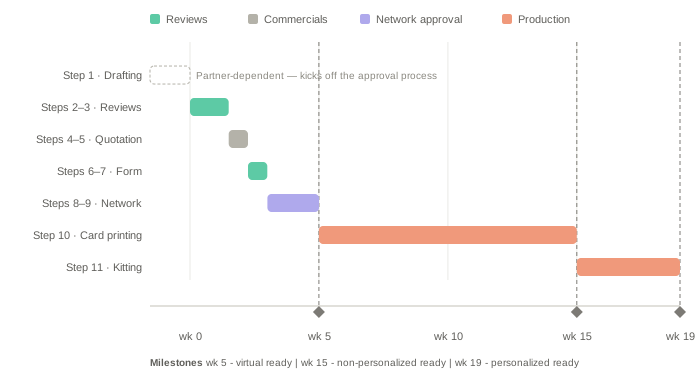
From the first draft submission: 2–5 weeks to network approval — 1–3 weeks through the reviews and the pre-press form, then 1–2 weeks for the network's decision, assuming approval on the first pass. A virtual card is ready at that point. A physical card is in hand around 19 weeks, since production and fulfillment add a further 10–14 weeks.
Each round trip between submission and approval adds a further pass, which compounds. See Timelines, Review, and Approval.
Card design is not a cosmetic step. The Payment Network reviews every card face against its brand standards before a single card is printed, and a rejected design restarts the review clock. Most rejections are avoidable: a logo placed too close to a network mark, a background that swallows the brand mark, a security feature omitted, or artwork supplied in the wrong color space.
This guide covers Card Design Submission and Card Design Approval — Steps 4 and 5 of the launch sequence. It is authoritative for card design: what the card face must carry, how it is laid out, and the reviews it passes through.
Two numbering systems appear in this guide. Steps 4 and 5 refer to the launch guide's seven-step sequence. The eleven steps in Timelines, Review, and Approval are the card design process itself, from first draft to a card ready for distribution.
Who does what
Partner | Produces the artwork, supplies brand assets, customer service details, and the card order count, clears internal branding approvals, approves the pre-press form, and settles the invoice |
MatchMove | Supplies the design template and Payment Network artwork; reviews against network standards, Financial Institution requirements, and prior approval experience; prepares the quotation with the bureau; generates the embossing file |
Financial Institution | The regulated issuer and BIN (Bank Identification Number) sponsor. Reviews the design for its own branding, hotline, and market disclosures, and accepts issuance under its license |
Personalization bureau | A certified card vendor. Checks the artwork against its printing process, produces the pre-press form, submits it to the Payment Network, prints and kits the cards |
Payment Network | Mastercard. Approves the design at step 9 |
Partner artwork deliverables
The Partner produces and submits the artwork; MatchMove supplies the template and Payment Network artwork to build it on (Sections 5 and 6), and the Financial Institution supplies the legal text wording.
Physical card artwork | The design is printed on the plastic, front and back. The only deliverable that goes to a printer, and the subject of Sections 5 to 6 | The program issues plastic. |
Virtual card artwork | The design for a card issued without plastic. It exists only on screen, so this file is the image displayed in the app. | The program issues virtual cards. |
Cards are also represented on screen in two forms: non-tokenized art in the Partner application or website and tokenized art in a third-party wallet after provisioning. All virtual card art is horizontal and requires Mastercard approval — see Virtual Card Art and Integration.
Note. On-screen digital card display behavior is not in scope, nor is tokenization itself. The first is documented in On-screen digital card display.
Process at a glance
Eleven steps sit between a first draft and a card ready for distribution. Six are approvals, three are reviews or checks, and two are production. What Mastercard approves is not the Partner's artwork but the digital pre-press form produced from it.
1 | Partner branding sign-off and draft submission in CMYK (Cyan, Magenta, Yellow, Key) for physical or RGB (Red, Green, Blue) for virtual | Partner | Virtual and physical |
2 | MatchMove internal review | MatchMove | Virtual and physical |
3 | Financial Institution review | Financial Institution | Virtual and physical |
4 | Joint artwork review and production printing quotation | MatchMove / bureau | Physical only |
5 | Invoice settlement | Partner | Physical only |
6 | Pre-press form | Personalization bureau | Physical only |
7 | Pre-press form approval | Partner | Physical only |
8 | Card design pre-press form submission | Bureau, or BIN sponsor on virtual | Virtual and physical |
9 | Card pre-press form approval | Payment Network | Virtual and physical |
10 | Mass card printing | Bureau / MatchMove | Physical only |
11 | Card kitting, personalization and last-mile delivery | Bureau / courier | Physical only |
Virtual programs run five of the eleven — the three reviews, then submission and approval. Timelines, Review, and Approval sets out what happens at each step, who owns it, and what changes by card type.
2. When to Start, and What Gates Submission
Design starts at kick-off. Submission is gated. Treating them as one block is the most common way partners put card design on the critical path unnecessarily.
Artwork drafting runs in parallel with BIN setup, PPM (Prepaid Program Management), and DFCP (Digital First Card Program). None of those needs to complete first. Because the design must also clear the Partner's internal branding approvals — frequently the slowest link — starting early matters.
To begin, the Partner needs the design template .ai files provided by MatchMove at kick-off (see The Card Design Template), its own brand guidelines, and a decision on numberless versus full-detail design.
Four conditions for gate submission. Each supplies something the design depends on, so working past them costs time rather than saving it.
BIN assignment | All programs | The BIN encodes the network, funding type, product tier, and country of issuance — each of which changes what must appear on the card face. Each BIN also carries a Mastercard program code with an associated design requirement: a BIN on the Business Debit program code must show the Business Debit identifier. On a numbered card the printed PAN (Primary Account Number) must begin with the assigned BIN |
PPM approval | Prepaid BINs only | Registers the program and its name with the network. The card face carries that name. |
DFCP approval | Numberless designs only | The network's certification of the digital credential experience — what makes omitting the PAN, expiry, and security code compliant rather than a missing element |
Sampling decision | All programs decide; only physical can sample. | Changes both the quotation and the schedule. Sampling adds 3–5 weeks and a charge and is mandatory on metal and LED cards. |
Design freeze happens at step 9, on Payment Network approval — not before. Everything up to that point is revisable, which is the purpose of the sequence: objections surface while changes are still cheap. After freeze, a change is a resubmission — see Timelines, Review, and Approval.
3. Timelines, Review, and Approval
⏱️ 1–3 weeks through steps 1 to 8, then 1–2 weeks for the network's decision at step 9, at an SLA (Service Level Agreement) of 5 business days per round. Optional sampling adds 3–5 weeks. Excludes the Partner's drafting time, and compounds with each round trip.
Card artwork design sits at the top of the timeline and starts the approval process. Week 0 is the Partner's draft submission, not project kick-off: step 1 is Partner-dependent, has no fixed duration, and sets the date everything downstream begins. Production dominates: steps 1 to 9 take about five weeks, printing and kitting the remaining fourteen. A change caught before step 9 costs a revision cycle; caught after, it costs a reprint. Readiness milestones are marked on the chart: virtual at week 5, non-personalized physical at week 15, personalized physical at week 19.
What happens at each step
1 | Partner branding sign-off and draft submission in CMYK for physical, RGB for virtual | Draft [.ai] artwork, card order count | The Partner clears internal brand, marketing, and legal approvals, then emails the package to the MatchMove Implementation team — there is no upload portal. One complete set per design. The package is: print-ready front and back as [.ai] files at 100% scale on the MatchMove template with the die-line on its own layer, plus [.pdf] proofs; the virtual card art [.ai] file where the program issues virtual cards, with a mock-up if the credentials are not on the front; the activation QR artwork where used; a specification sheet naming stock, finish, personalization method, any specialty process, and the color inventory; the card order count and sampling decision; and evidence that the BIN, PPM, and DFCP prerequisites are met |
2 | MatchMove internal review | Draft [.ai] artwork, review feedback | Checked against network brand standards, Financial Institution requirements, the bureau's technical specifications, and what has actually passed and failed across hundreds of previous approvals. Expect feedback on points the published standards do not cover — submit a rough draft early rather than a polished design late. |
3 | Financial Institution review | Reviewed [.ai] artwork, sign-off | Checks its own branding, hotline, and market disclosures, and accepts issuance under its license |
4 | Joint artwork review and production printing quotation | Reviewed [.ai] artwork, quotation, invoice | The bureau checks fonts, colors, and production settings against the press and recommends changes. The quotation then prices per-card cost, production at volume, the pre-press form, network approval, and — where they apply — kitting, personalization, and delivery. |
5 | Invoice settlement | Settled invoice | The Partner settles the invoice. The bureau does not begin the pre-press form until payment is received |
6 | Pre-press form | Digital pre-press [.pdf] form | The bureau produces the form from the corrected artwork. Rework carries a charge depending on the severity of the changes |
7 | Pre-press form approval | Digital pre-press [.pdf] form | The Partner confirms the pre-press form matches the design intended. A rejected form returns the design to step 1, and a further redesign form is chargeable. |
8 | Card design pre-press form submission |
| Submitted to the Payment Network portal. On virtual programs the BIN sponsor submits directly. |
9 | Card pre-press form approval | Network approval | Brand compliance checked and approval granted. USD 750 per design, valid two years. On rejection: a content placement issue returns to step 6, an artwork issue to step 1 |
10 | Mass card printing | Purchase Order, embossing file, printed cards | The bureau receives the PO and notifies MatchMove, which generates the embossing file against the approved BIN. The bureau prints |
11 | Card kitting, personalization and last-mile delivery | Kitted cards, carriers, inserts, delivery |
|
Three of the eleven steps are the Partner's — branding sign-off, invoice settlement, and form approval. Each is a hard stop until the Partner acts. Two carry a charge: the pre-press form at step 6 and each network round at step 9. Steps 1 to 3 are free, so a problem caught there costs a revision while the same problem later means a new form, a further network round, or both.
The Financial Institution review should confirm, not discover — its requirements are supplied at kick-off and checked at step 2, so a surprise at step 3 means a gap in the package. The bureau's check is about printing, not design: expect comments on type that will not hold at card scale and colors that will not separate cleanly, but the design decision remains the Partner's.
Round trips compound
A network comment is not a quick edit: the form is revised, earlier reviewers see it again, and the SLA resets because each resubmission is a new request. Approved first pass, submission and approval take 2–5 weeks; two comment rounds plus sampling can pass 10 weeks. There is no cap on rounds — the argument for using the free reviews properly.
Pre-press form and physical sample
The digital pre-press form is a PDF (Portable Document Format) showing the artwork, typography, and exact placement of the chip, stripe, network marks, legal statement, issuer logo, and customer support number as they will print. The bureau produces it at step 6 from artwork already corrected at step 4. It is what the Partner signs off at step 7 and what Mastercard approves at step 9, reviewed for symbol sizing and clearances, PANTONE and CMYK color use, contrast, and placement of mandatory elements. Until that approval the bureau cannot legally print cards carrying the Mastercard mark.
Not to be confused with the pre-press proof — the technical blueprint used to set up the press, carrying CMYK and PANTONE separations, bleed lines, crop marks, overprint settings, and sheet layout. The bureau prepares both; only the form is submitted.
Required? | Mandatory on physical programs | Optional, mandatory on metal and LED |
Approved by | Partner and Payment Network | Partner |
Adds | Nothing — inside the step 9 window | 3–5 weeks |
Shows | Layout, placement, and content as printed | Color, finish, and feel in the hand |
A sample earns its weeks where the design depends on something a screen cannot show — foil, metal, matte or textured laminate, spot varnish, or a PANTONE match that must be right the first time. Decide before submission, since it changes both the quotation and the schedule.
When submission can start
Submission is gated on upstream approvals, so the earliest date is set by the slowest applicable gate rather than by how fast the artwork is finished.
Prerequisites — Agreement and Due Diligence | 2–3 weeks | All programs |
Step 1 (BIN Selection and Setup) | 7–9 weeks | Dedicated BINs only |
Step 2 (PPM) | 4–7 weeks | Prepaid BINs only |
Step 3 (DFCP Form) | 2–4 weeks | Numberless designs only |
On the default configuration — shared BIN, prepaid, numberless — the design waits on the PPM, so submission opens roughly 6–10 weeks after kick-off even where artwork was ready in week two.
Frequent rejection causes
Most are covered by Never place on the card face under Factors That Affect Card Design. The ones specific to submission rather than design:
- A required product, tier, or source-of-funds identifier omitted for the issuing market
- The contactless indicator missing on a contactless-enabled card
- Fonts not outlined, or artwork supplied in RGB
- Elements intruding into the chip, stripe, or signature panel zones
- Placeholder text, visible template layer names, or crop marks left in the file
Changing a design after approval
An approved design is locked. Changing it is a resubmission, not an edit, and the cost depends on how far it has traveled. Any change after network approval is treated as a new design, with its own approval timeline and USD 750 fee.
After approval, before production | The design unfreezes and re-enters the sequence: MatchMove, Financial Institution, and a fresh Payment Network review. Expect the full sequence again, plus a further chargeable network round. |
After production has begun | Production runs 10–14 weeks and cannot be partially recalled — card printing 8–10 weeks, stationery 6–7 in parallel, then kitting 2–4, and kitting cannot start before the stationery is produced. Cards already printed carry the old design. The Partner may abandon that stock, in which case the full cost is sunk. |
After cards are in circulation | Cards in the field are not recalled. The new design applies to newly issued and reissued cards only, so both circulate until the old stock cycles out. The Partner may terminate cards early and replace them — the replacement is a new card type, reconstructed on the MatchMove back end with its own card type code — see Virtual Card Art and Integration |
What counts as a change. Any alteration to the approved artwork — color, imagery, logo, layout, or finish. Correcting a typo in the legal text is a change. Swapping a finish is a change and a re-cost.
Both designs remain live. A revision does not replace its predecessor in the field. Plan for a period — potentially years, given a three-to-five-year card lifecycle — in which cardholders hold either version.
The screen image updates immediately. Once the revised design is uploaded, the API serves the new image to every application reading from the card object. A cardholder holding an old physical card may see the new design in the app. If that matters, discuss sequencing with MatchMove before submitting the change.
A new variant is usually cheaper than a revision. Where the goal is a different look rather than a correction, adding a second design with its own card type code leaves the approved one undisturbed and lets both run in parallel.
4. Costs and Charges
A card program carries up to nine chargeable items, quoted together in a single invoice at step 4. Which applies depends on the card type.
Card approval | USD 750 per design, valid for two years, then renewable. Charged per Payment Network review round | Not chargeable | Mandatory | Mandatory |
Digital pre-press form | Charged per event. A rejected form means a further form and a further charge. | Not applicable | Mandatory | Mandatory |
Production printing | Cost per card, and the overall cost at the card order count | Not applicable | Mandatory | Mandatory |
Kitting | Assembly with carriers and inserts | Not applicable | Mandatory | Optional |
Card data generation and file transmission | Per record, preparing card details for both personalized and bulk processes (emboss and reversed emboss record) | Not applicable | Mandatory | Mandatory |
Design profile template setting | One time per design, on first production of a new design | Not applicable | Mandatory | Mandatory |
Personalization (individual and bulk) | Writing cardholder data and card details to the chip and magnetic stripe, and printing the details on the card surface. Applies to numberless designs too — the cardholder name is still required on the face | Not applicable | Mandatory | Mandatory |
Last-mile delivery | Courier delivery to the cardholder, on personalized programs | Not applicable | Mandatory | Not applicable — see one-time delivery |
One-time delivery | Bulk delivery of non-personalized stock to a single address. Quoted and charged separately, outside the step 4 quotation | Not applicable | Not applicable | Optional, depending on the country |
Virtual programs carry no charges here. Card approval is free for virtual cards, and there is nothing to proof, print, kit, personalize, or deliver. Submission to the Payment Network is made directly by the BIN sponsor, not the bureau.
Non-personalized cards are bulk personalized. Personalization still happens — the same process, without a cardholder name. The card data is generated in bulk, one batch for the quantity ordered, and the personalization process writes and prints the card information itself: PAN, expiry, and CVV. Only the name is absent.
Because there is no cardholder name on the card, there is no address to deliver to. Kitting remains available as an option, together with stationery fulfillment. The cards then ship in bulk to a single destination, quoted and charged separately as a one-time delivery outside the step 4 quotation. The program owner then manages the card inventory and distributes cards to individual cardholders directly.
Fee waivers can be applied for case by case where a design goes through multiple network rounds — raise it with MatchMove rather than assuming the charge is fixed.
Multiple designs in one program
A program can run tiers, variants, co-brands, and limited editions on the same BIN, but each design is submitted and approved separately — no bulk approval. Two designs means two of everything, including its own chargeable network rounds, its own printing quotation, and its own print run clearing the minimum order quantity independently. Specialty finishes on one variant do not price the others.
An approval does not travel between regions. The Financial Institution arrangement differs in every region, and with it the licensing statement, the source-of-funds identifier, and the local regulatory disclosures the card face must carry. Expect a separate design and approval in a second market even where the artwork is visually identical.
Minimum order quantity
Card printing is volume-priced, and there is a minimum order quantity — currently 1,500 cards. This figure is subject to change; confirm the current minimum with MatchMove before committing.
Two consequences:
- The minimum applies per design. A program running three designs runs three print jobs, each of which must clear the minimum on its own. Three designs is not three variations on one order.
- It sets a floor on the program. A design decision that looks free at the artwork stage — adding a premium tier variant, for example — carries a minimum print commitment behind it.
5. The Card Design Template
Work in the template, not from this section. MatchMove provides the Mastercard card design template as an Adobe Illustrator (.ai) file containing precisely mapped vector layers, technical dimensions, and mandatory branding placements required to meet Mastercard's global Rules and Standards. It is the blueprint for laying out card artwork, and it is authoritative where this guide and the template differ.
Horizontal and vertical templates are both provided. Mastercard only at present.
What the template contains
1. Mandatory branding assets
- The Mastercard Brand Mark — official vector versions of the interlocking red and orange circles, using exact PANTONE color matching. These must not be converted to CMYK.
- Brand mark placements — separate layer variations showing valid placements, typically the top right or bottom right corner of the card front.
2. Physical layout and dimensions
- Card boundaries — a base shape at standard ID-1 / CR80 dimensions, 85.60 mm × 53.98 mm.
- Bleed and safe zones — pre-configured gridlines indicating where critical text or graphics must end to avoid being cut off during high-volume manufacturing.
- Element placement — the permitted position of every element on both faces, marked to scale: where the brand mark, chip, contactless indicator, magnetic stripe, signature panel, account details, issuer logo, customer service contact, and legal text sit relative to one another and to the card edge. This is what the template settles and this guide does not — take every placement from the .ai file.
3. Structural hardware overlays — keep-out zones
- EMV (Europay, Mastercard, and Visa) chip placement — a precise bounding box where the metallic microchip will sit. Design elements are blocked from this area to preserve hardware functionality.
- Contactless indicator — the universal radio wave symbol, showing where the contactless antenna graphic belongs.
4. Personalization and variable data outlines
- Cardholder data — dummy text placeholders for the 16-digit PAN (Primary Account Number), expiration date, and cardholder name.
- Font guidelines — sizing and layout requirements detailing how embossed, indent-printed, or laser-etched text aligns with the overall design. The bureau's default is Arial. Partner’s will need to supply the font, and the perso bureau will check if that is compatible and can be imported into their system to be incorporated into the perso process.
5. Card back elements
- Magnetic stripe zone — a standardized horizontal block mapping the high-coercivity stripe.
- Signature panel — a designated block outline for the physical signature strip.
- Security details — placement outlines for the three-digit CVC 2 (Card Validation Code 2) security code, compliance text, and issuer contact details.
The canvas at a glance
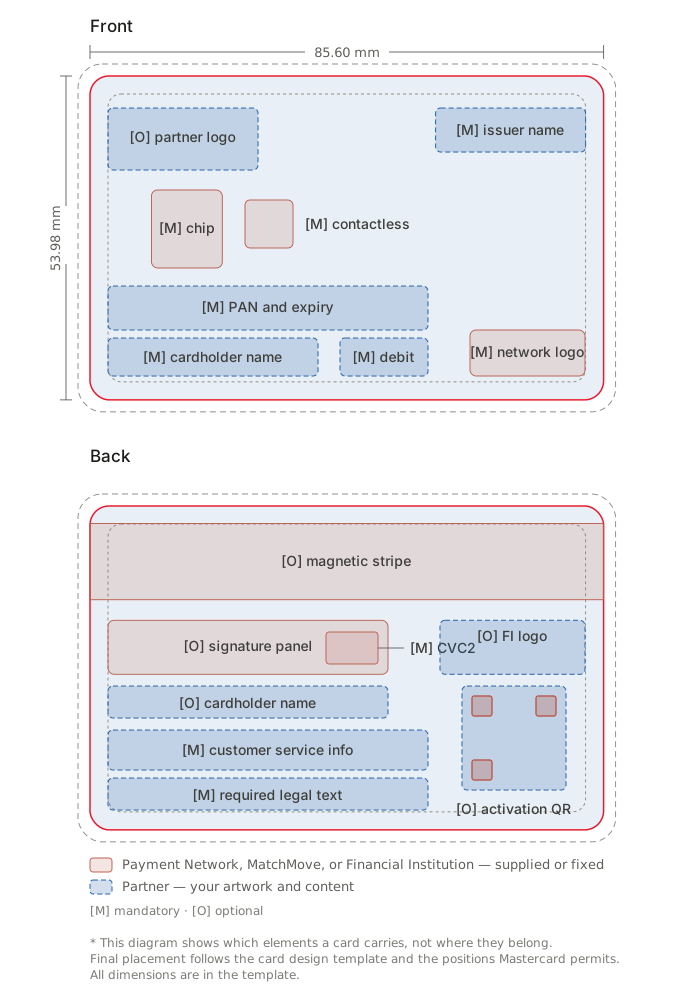
For orientation, the diagrams below show how the elements relate on both faces. They are not a substitute for the template — every measurement and placement comes from the .ai file.
The same anatomy in vertical orientation:
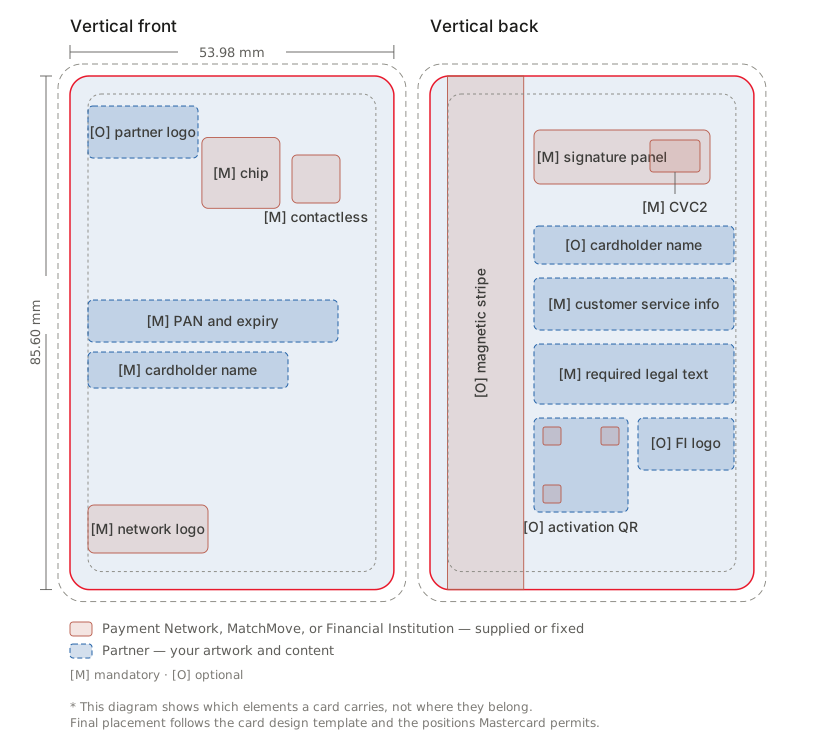
The diagrams use two colors. Blue marks Partner elements — the card artwork, your logo, and the printed fields you position. Red marks supplied or fixed elements from Mastercard, MatchMove, or the Financial Institution, which must not be altered. Elements are tagged [M] mandatory or [O] optional under Payment Network rules — not what the program needs commercially and not what MatchMove or the Financial Institution may require. The template is authoritative.
Note. Whether the cardholder name appears at all depends on the personalization type: individual personalization carries a name, bulk personalization does not. Where it appears, it normally sits on one face only — front or back. If both sides are required, additional charges will apply.
Valid layout variations
There is no single correct layout. The three variations below differ in how the account details are applied to the card — the personalization method — not in the artwork itself. The same design can usually be produced either way; what changes is the manufacturing process, the cost, and where the printed details can sit.
Three horizontal designs, each front and back:
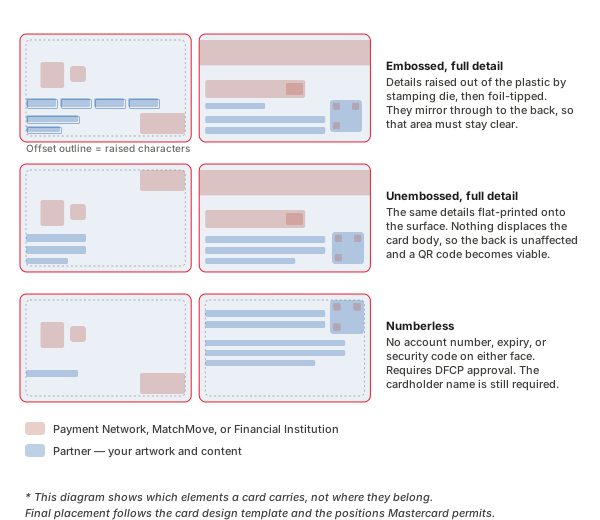
- Embossed, full detail — the conventional layout. The account number, expiry, and cardholder name are physically raised out of the plastic by a stamping die, then usually tipped with foil. The network logo sits over the raised numerals. Because the characters displace the card body, they push through and appear in mirror on the back, so the reverse must leave that area clear.
- Unembossed, full detail — the same details flat-printed onto the surface rather than raised. Nothing displaces the plastic, so the back is unaffected and the front reads cleaner. Printed details may be positioned differently from embossed ones, so do not carry an embossed layout across unchanged. This is the more common choice on new programs and is a prerequisite for an activation QR code on the back.
- Numberless — no account number, expiry, or security code on either face. Credentials are delivered in the app, and the design is stripe-free with no signature panel. Requires an approved DFCP before submission. The cardholder name is still required and is usually the only personalized element on the face, though a shortened form may be substituted. Freeing the PAN zone opens the largest usable area on the card — the strongest numberless designs use it as negative space rather than filling it, and the back carries the service and legal text that would otherwise compete with account data.
Three vertical designs:
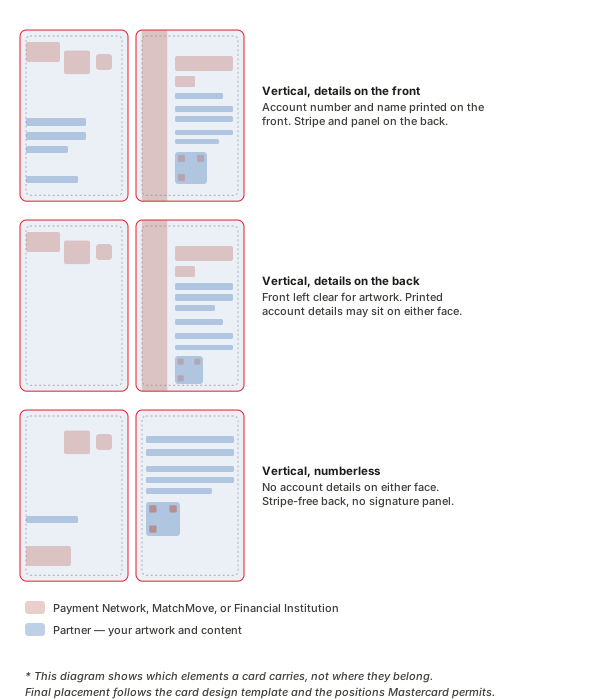
The chip and magnetic stripe do not move. They are built into the plastic during manufacturing. On a vertical design the card is held with its long edge upright, so the stripe runs as a band down the left side of the back and the chip sits near the top of the front, with artwork and text upright beside them.
Two consequences. A vertical back has less usable width, because the stripe takes a full-height band instead of a strip across the top. And a vertical card still needs horizontal virtual card art — plan that second layout from the outset.
What the template does not settle
Five things sit outside it, and each needs a conversation with MatchMove:
Secure Symbol or hologram. Every card carries a security element, and there are two routes. Availability is gated by region — not both are offered in every market, so confirm which applies to yours with MatchMove before designing.
What it is | A special/premium network symbol, made up of holographic material hot-stamped onto the front, used in place of the standard printed brand mark | The conventional holographic patch, usually on the back |
Effect on the back | The back opens up. With no hologram there and no signature panel required by Mastercard, the whole face becomes available for design. | Claims its own area on a face already carrying the stripe, signature panel, and legal text |
Magnetic stripe withdrawal. Mastercard has published a phased withdrawal: from 2024 the stripe is no longer required on newly issued cards in most markets; from 2027 the transition begins in the United States; from 2029 no new Mastercard debit cards will be issued with a stripe; and by 2033 stripes are expected to be out of circulation, with prepaid cards in the United States and Canada currently exempt. If your program has a multi-year reissue cycle, discuss stripe-free design now rather than at the next redesign.
Required legal text and the Licensee Acknowledgement Statement. The legal text names the technology provider and the Financial Institution, plus the licensing statement, cardholder agreement reference, and any local regulatory disclosure. It is supplied as exact wording and must not be edited or abbreviated — if it does not fit, the layout changes, not the text. The Licensee Acknowledgement Statement is required on the back where the issuer name or logo is not included on the card; it is optional where the issuer logo is provided. In Asia-Pacific the wording names Mastercard Asia/Pacific Pte. Ltd. as licensor.
Financial Institution requirements. These vary by institution and market — there is no universal list. MatchMove provides the applicable set at kick-off and checks it at step 2. Categories that commonly appear: issuer logo, customer service contact, lost or stolen card reporting, cardholder agreement reference, a regulatory or deposit insurance mark, and property-of-issuer wording. A requirement surfacing at step 3 is a gap in the kick-off package, not a design fault.
Production elements are added by the bureau and must be accommodated rather than designed: the 2D barcode, manufacturer ID, and print sequence number. "ELECTRONIC USE ONLY" is required on flat-printed cards.
6. Factors That Affect Card Design
The template settles geometry. These choices shape how the design is reproduced, and each carries a cost or timeline. Confirm the specifics with your MatchMove implementation contact.
Brand mark placement | Nothing of yours enters the mark's exclusion zone. Use the reverse, alternate, or binocular treatment where the background is dark or busy. | Clear space is drawn in the template, but the template cannot stop you from filling it — the most frequently violated rule in card design. A dark mark on a dark background is a rejection regardless of composition. |
Card material | Standard PVC (polyvinyl chloride), recycled PVC, or metal | Metal has the longest lead time and highest cost, mandatory sampling, and needs milling for chip insertion. PVC can carry a tint or fleck that shifts light backgrounds. |
Color and finish | Gloss, matte, frosted, or spot UV; silver, gold, or rainbow foil; textured laminate. Mastercard Symbol in full-color match PANTONE only — never built in CMYK. | Gloss saturates and shows scuffs; matte mutes deep tones but improves legibility; spot UV needs a matte base for the contrast to read. Foil does not reproduce as a printed color — specify as foil. Deep saturated backgrounds print differently on PVC than on screen, and aggregator sites carry conflicting brand values — the supplied artwork is the only correct source. |
Special effects | Any feature embedded in the card body rather than printed on it — LED illumination is the common case. The affected area is co-designed with the manufacturer. | LED lights are powered by the terminal's contactless field and glow through a chosen area of the artwork. Non-standard construction, so sampling is mandatory and runs longer than the standard window. |
Personalization | Embossed or flat-printed. Size the cardholder name field against a full-length 25-character string, and supply any font file to the bureau. The name comes from | Embossing displaces the card surface and distorts adjacent print on both faces. Method changes where printed details may sit and whether a QR code is viable. A name field sized to a short sample oversets in production. The default recommendation is to use the flat-printed method, as it is easier to plan and arrange with the other card details settings. |
Imagery | Contrast around every mark and printed field; legible at card scale | Nothing that reads as endorsing another payment brand or institution. Fine detail disappears on plastic. |
Three things follow from the table:
- Specify material and finish before submission. They are cost inputs and part of what the network approves.
- Request a physical sample for anything specialty. Foil, matte, metal, and spot varnish all shift between screen, proof, and production — and a dark matte or textured surface can pull the network mark below the contrast threshold.
- Confirm availability. Not every finish is offered by every bureau or in every market.
Never place on the card face
These are the most common causes of design rejection — each something a designer added in good faith that Mastercard does not permit.
- Altered network artwork. Do not redraw, recolor, stretch, skew, rotate, crop, or apply effects to the Mastercard Symbol.
- The Mastercard wordmark alongside the Symbol. Since November 2018 the full-color Symbol without the wordmark is the card treatment.
- Grayscale or solid Mastercard Brand Mark on the chip side, or on the visible side of a card in any digital payment environment.
- Anything intruding into brand mark clear space, or background imagery that drops the mark below readable contrast.
- Competing payment network or acceptance marks, unless the program is formally co-badged and the arrangement approved.
- The word "card" inside the program name. "World Elite Mastercard" is correct; "World Elite Mastercard Card" is not.
- Translated network names. English only, except authorized versions in Chinese, Arabic, Georgian, and Korean.
MatchMove provides the design template and all artwork assets — the template .ai files described in The Card Design Template, the Payment Network artwork built into them, and the required legal text. Mastercard card artwork lives on Mastercard Connect, restricted to financial institutions and certified card manufacturers, so a Partner has no direct route to it. Never source a brand mark from a web search, a brand aggregator, a competitor's card image, or a marketing-use download — a mark rebuilt or resampled from an image will fail review.
The Partner supplies its logo in production-ready vector, background artwork and palette, licensed fonts converted to outlines, customer service details in the form the Financial Institution requires, the activation QR code artwork where used, and the finished files assembled on the template.
7. Virtual Card Art and Integration
Two things sit on the integration side of card design: the virtual card art shown on screen and how any approved design reaches the application once MatchMove uploads it.
Virtual card art
Virtual card art is the image representing the card on screen — in the Partner application or website and in third-party wallets. It is a separate deliverable from the physical artwork, built from the card art template Mastercard provides, and all of it must be horizontal — a vertical physical design has to be relaid out.
Two kinds, with different requirements.
Where it appears | Partner application or website | Third-party wallet — Google Pay, Apple Pay — provisioned through MDES |
Required | Partner logo (upper left), Mastercard logo (lower right), cardholder name, placeholder 16-digit PAN, CVC, expiry, and the card type identifier where the BIN requires one | Partner logo, Mastercard logo, and the card type identifier where the BIN requires one |
Prohibited | PayWave icon, chip image | PayWave logo, chip image |
Specification | As above | Issued per wallet project. Do not design against a general specification. |
Where the credentials are not on the front, the name, PAN, expiry, and CVC must appear near the card art in the app. Where the art simulates a flip animation, those four may sit on the back, leaving the front clean with only the two logos.
Submission. The AI file from the Mastercard template, plus a mock-up where the credentials are not on the front. All virtual card art requires Mastercard approval — including the digital art that represents the physical card, which is treated as a virtual card approval — before use. It is not covered by the physical card design approval for printing; those are two separate approvals.
Consuming approved designs
MatchMove uploads the design, and the API serves it on the card object for both physical and virtual cards. Read it from the API rather than hardcoding a copy — the API always serves the currently approved artwork, revisions propagate without a release, and a program running several designs cannot serve one embedded image correctly. See Issue a card.
Each approved design has its own card type code, passed as a parameter whenever a card is created to select which design that card carries. A program issuing three designs has three codes, and the application must know which to send — a build decision that needs to reach the development team before integration starts, since an incorrect code issues physically different plastic and the error only shows once the card is produced.
Three identifiers are easily confused:
Mastercard program code | Mastercard, against the BIN | The card product type — Business Debit, for example. Determines which design requirements apply |
MatchMove program code | MatchMove | Which program is running |
Card type code | MatchMove | Which approved card design |
A program has one MatchMove program code and one or many card type codes. The Mastercard program code belongs to the BIN, not the program.
Not covered here. The full wallet artwork package — app icon, card label, color parameters — is specified per project when a wallet integration is initiated; raise it at kick-off, since it carries its own approval cycle. Display behavior is documented in On-screen digital card display.
8. References
Authoritative — gated
These are the governing documents. Neither is accessible to Partners directly; MatchMove holds the access and supplies what a Partner needs from them.
- Mastercard Card Design Standards — the authoritative source for all Mastercard physical card design requirements, including placement coordinates, minimum sizes, and back-of-card specification. Published on Mastercard Connect (
mastercardconnect.com), restricted to financial institutions and certified card manufacturers.
Where a Partner needs a specific requirement confirmed against either document, route the question through the MatchMove implementation contact rather than seeking access.
Public — background reading only
The links below are useful for understanding the standards. They are not an artwork source: all brand assets for a MatchMove card program come from MatchMove.
- Mastercard Branding Requirements —
https://www.mastercard.com/brandcenter/us/en/brand-requirements/mastercard.html - Mastercard Rules —
https://www.mastercard.com/content/dam/mccom/shared/business/support/rules-pdfs/mastercard-rules.pdf
Note. The requirements in this guide are a consolidated, simplified summary drawn from the public brand standards above and from MatchMove's implementation experience. Where a specific measurement, coordinate, or minimum size is required for a Mastercard design, the Card Design Standards is authoritative and this guide is not a substitute for it. Partners are expected to comply with the version of each standard current at the time of card production.
On this page
- Card design submission