API Versioning
API versioning in Theneo is designed to be both intuitive and comprehensive, accommodating the natural evolution of your APIs. With Theneo, you can manage and track incremental changes within the same version using the API changelog, as well as create and oversee major version transitions such as moving from v1 to v2 or v3.
Theneo now offers a feature for comprehensive API version management. This feature enables users to meticulously handle different versions of their API, such as v2, v3, and beyond, each with unique statuses and configurations.
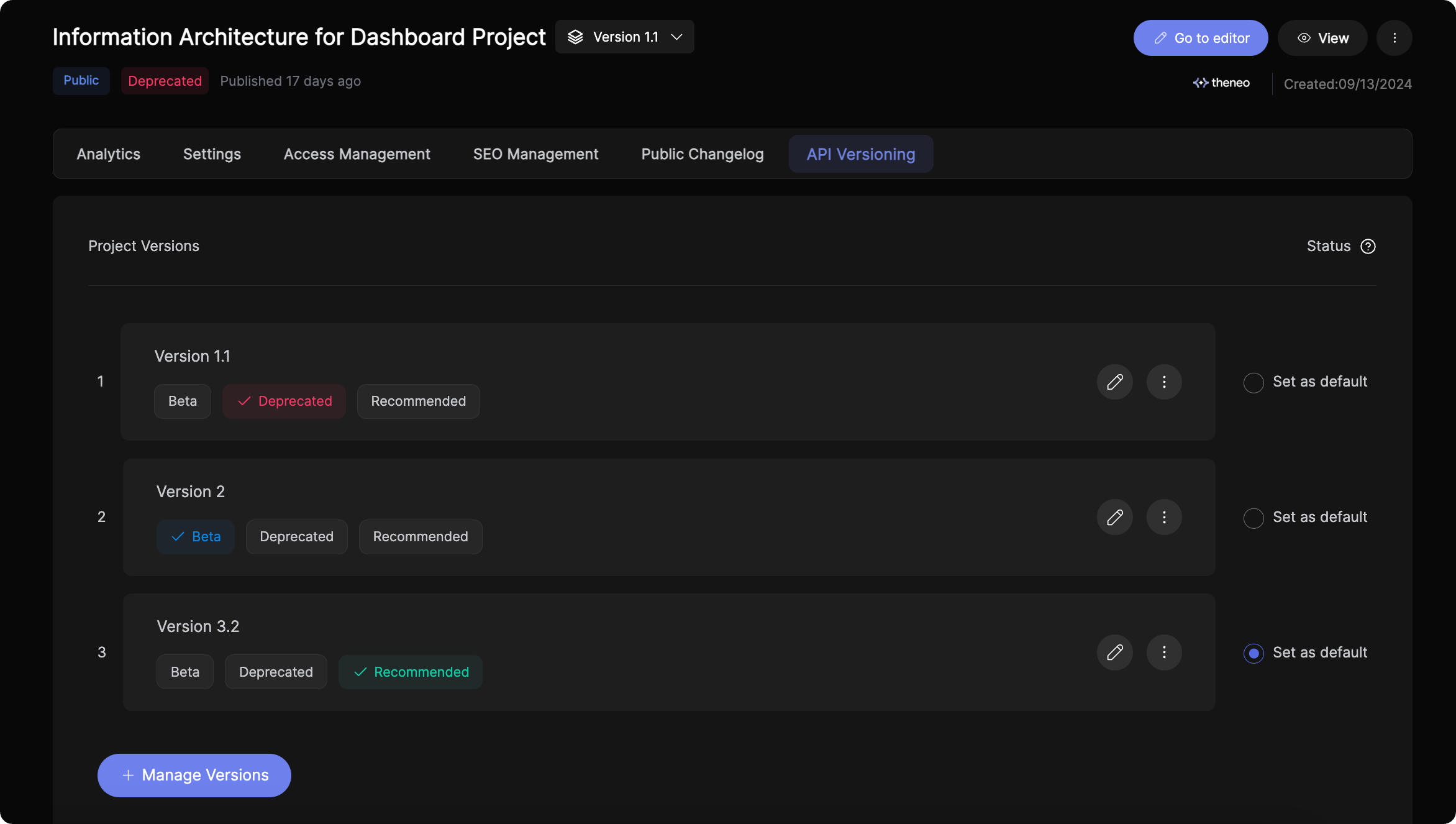
Key Features of API Versioning
- Multiple Versions: Create and manage multiple versions of your API, whether it’s incremental updates or major releases.
- Status Labels: Assign statuses like active, beta, or deprecated to each version, along with any custom attributes you may need.
- Project Configuration: Tailor each API version’s project settings, including access management, SEO settings, and analytics.
- Version-Level Changelogs: Track changes within specific versions, enabling clear communication of updates from 1.1.2 to 1.1.3, etc.
Utilizing the Versioning Feature
- Add New Versions: Easily add a new version through your project dashboard by importing a new API spec or using an existing one as a base.
- Import Specs: Use the intuitive interface to upload file, link, import from Postman, or input raw text for your API specs.
- Manage Versions: Navigate to the settings menu to manage features, access permissions, SEO optimization, and analytics for each API version.
- Set Version Status: Define the lifecycle stage of each API version with appropriate status labels directly from the project versions screen.
Managing API Versions in Theneo
Theneo allows you to create and manage multiple API versions seamlessly. Follow the steps below to create new versions, set defaults, and control visibility for better version management.
Creating a New API Version
- Access the API Versioning Tab
- Navigate to the Project Dashboard and open the API Versioning tab.
- Manage Versions
- Click on the Manage Versions button to open the version management modal.
- Add a New Version
- Enter a name for the new version.
- Choose how you want to create the version:
- Import an updated OpenAPI specification to reflect the latest API changes.
- Use an existing version as a starting point and make modifications directly in the editor.
- Save and Apply Changes
- Once the version is created, you can modify its content, update configurations, and ensure it aligns with your API changes.
Managing Version Tags and Default Versions
- After creating multiple API versions, you can organize them using version tags.
- You can also select a default version from the list. The default version will be the one automatically loaded when users access the documentation, ensuring they always see the most relevant version.
Hiding API Versions from Published Documentation
If you want to hide a specific API version from the published documentation:
- Open the three-dot menu next to the version you want to hide.
- Click the Hide option.
- The version will be removed from the public-facing documentation but will remain accessible from the Theneo Dashboard for internal use. You can still view and edit hidden versions, but external users will not be able to see them.
Managing API Versions with CLI Automation
If you prefer to automate the creation and management of API versions, you can use the Theneo CLI. This approach is ideal for integrating version control into your CI/CD workflows or for teams that manage large-scale API updates programmatically.
For detailed instructions on how to create and manage API versions using the CLI, visit our CLI Guide.


On this page
- API Versioning