Quickstart
Get started with Theneo and publish your first API docs in minutes.
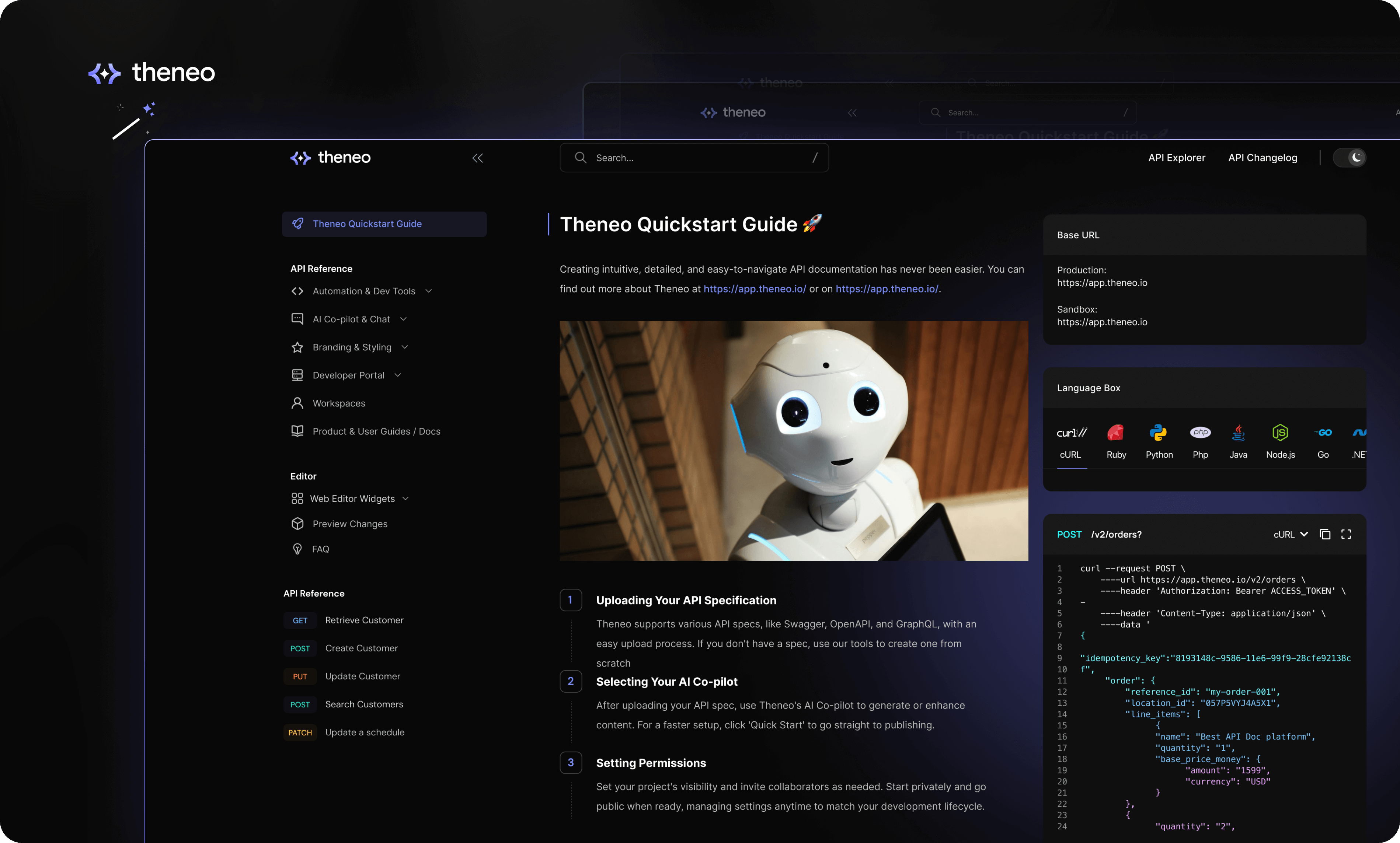
Creating intuitive, detailed, and easy-to-navigate API documentation has never been easier. Theneo streamlines every step of the process, ensuring that your documentation is not only comprehensive but also interactive and user-friendly. Here's how you can quickly set up your project in Theneo.
Getting Started
To create and publish documentation in Theneo, you first need to create a Theneo account. If you don’t have an account yet, you can sign up for free here.
Create Your First Doc
When you log into Theneo, start by adding a new project from the homepage. Your project could be an API reference, a developer guide, or any type of documentation you need. Give your project a title, select the appropriate workspace, and you're on your way.
Uploading Your API Specification
Uploading Your API Specification
Theneo accommodates a wide array of API specifications, making it easy to get started regardless of whether you have an existing spec or not. If you're equipped with Swagger, OpenAPI, GraphQL, or another format, the upload process is designed to be straightforward and efficient.
In case you don't have a spec ready, Theneo offers tools to help you create one from scratch. Use our intuitive interface to define your API endpoints directly within the platform. For additional guidance on creating or importing your spec and ensuring format compatibility, check out our guide.
Selecting Your AI Co-Pilot
Selecting Your AI Co-Pilot
Once your API specification is uploaded, you can harness the power of Theneo's AI Co-pilot to enrich your content. Decide whether you want the AI to fully generate the content, enhance what you've already created, or if you prefer to proceed without AI assistance. If you're looking to streamline the setup, simply click on "Quick Start" to bypass the customization and move directly to publishing.

Setting Permissions and Fine-Tuning Your Project
Setting Permissions and Fine-Tuning Your Project
Set your project’s visibility and invite collaborators according to your workflow needs. With Theneo, you can start with a private project and go public when you're ready, seamlessly inviting others to contribute. Manage these settings at any time to fit your project’s development lifecycle.
Publish
Publish
Utilize Theneo's editing suite for final adjustments before publishing. Preview to ensure everything is perfect and publish to make your documentation available to users. It’s documentation made simple, yet powerful and comprehensive
Optional steps


What made this section unhelpful for you?


On this page
- Quickstart
API Import
What made this section unhelpful for you?
On this page
- API Import
Other Docs & User Guides
What made this section unhelpful for you?
On this page
- Other Docs & User Guides
Themes & Templates
What made this section unhelpful for you?
On this page
- Themes & Templates
Migration
What made this section unhelpful for you?
On this page
- Migration
Markdown support
What made this section unhelpful for you?
On this page
- Markdown support
API Specs & Supported Formats
On this page
- API Specs & Supported Formats
API Testing
On this page
- API Testing
API Versioning
What made this section unhelpful for you?
On this page
- API Versioning
API Changelog
What made this section unhelpful for you?
On this page
- API Changelog
Web Editor Widgets
On this page
- Web Editor Widgets
API Management inside the editor
What made this section unhelpful for you?
On this page
- API Management inside the editor
Live Collaboration
What made this section unhelpful for you?
On this page
- Live Collaboration
Preview Changes
What made this section unhelpful for you?
On this page
- Preview Changes
Publish a Documentation
What made this section unhelpful for you?
On this page
- Publish a Documentation
Branding & Styling
What made this section unhelpful for you?
On this page
- Branding & Styling
Custom Domain
What made this section unhelpful for you?
On this page
- Custom Domain
Feedback & Analytics
What made this section unhelpful for you?
On this page
- Feedback & Analytics
Theneo UI
What made this section unhelpful for you?
On this page
- Theneo UI
Github Actions
What made this section unhelpful for you?
On this page
- Github Actions
Visual Studio Code Extension
What made this section unhelpful for you?
On this page
- Visual Studio Code Extension
Theneo CLI
What made this section unhelpful for you?
On this page
- Theneo CLI
Theneo SDK
What made this section unhelpful for you?
On this page
- Theneo SDK
Postman Sync
What made this section unhelpful for you?
On this page
- Postman Sync
GitLab Sync
What made this section unhelpful for you?
On this page
- GitLab Sync
Bitbucket
On this page
- Bitbucket
AI Co-Pilot
What made this section unhelpful for you?
On this page
- AI Co-Pilot
AI Search
What made this section unhelpful for you?
On this page
- AI Search
AI Chatbot
What made this section unhelpful for you?
On this page
- AI Chatbot
AI Export
What made this section unhelpful for you?
On this page
- AI Export
Templates
What made this section unhelpful for you?
On this page
- Templates
Custom Design
What made this section unhelpful for you?
On this page
- Custom Design
Developer Portal Editor
What made this section unhelpful for you?
On this page
- Developer Portal Editor
Export / Import Code
What made this section unhelpful for you?
On this page
- Export / Import Code
Developer Portal Dashboard & Page Management
What made this section unhelpful for you?
On this page
- Developer Portal Dashboard & Page Management
Project Management
On this page
- Project Management
Workspace Configuration
On this page
- Workspace Configuration